The Definitive Guide to the Best Client Portal Software


For any agency serious about finding the best client portal software, the search is about more than just file sharing. It’s about finding a central hub that can anchor the entire client relationship, blending secure messaging, project tracking, and billing into one branded space.
What Client Portal Software Actually Does for Your Agency
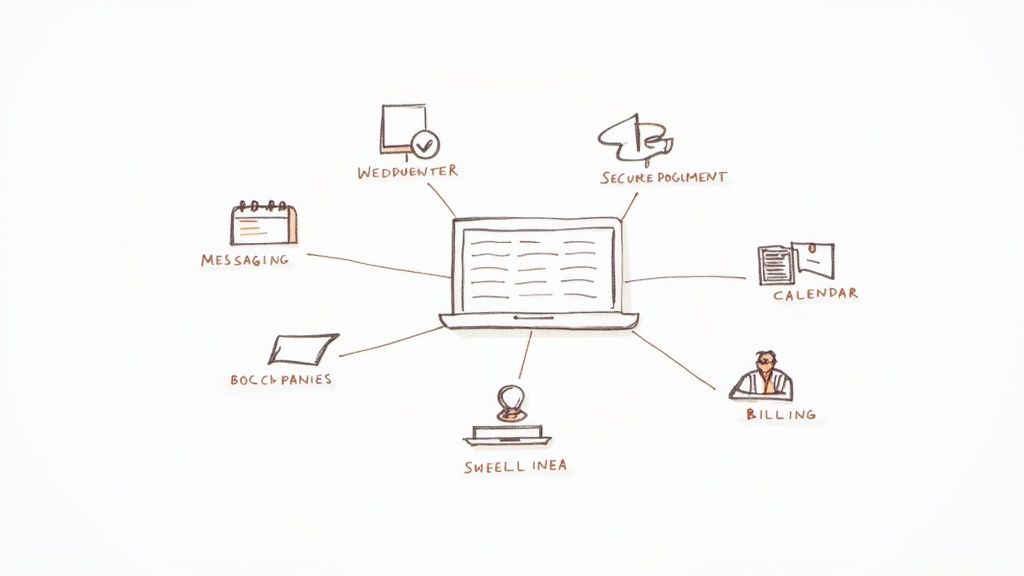
At its most basic, client portal software is a secure, private webspace where you and your clients can work together. Think of it as your project's command center, finally putting an end to scattered email chains, sketchy file-sharing links, and the constant back-and-forth of status update meetings.
In the early days, these portals were little more than glorified digital file cabinets. Now, they've evolved into robust platforms built to solve the most common and persistent headaches that modern agencies face every day.
Solving Core Agency Challenges
Every agency owner knows the operational friction that can bog down projects and sour client relationships. Disorganized communication leads to missed feedback and blown deadlines, while juggling insecure file-sharing services creates unnecessary risk. A great portal tackles these problems head-on.
Instead of your team digging through endless email threads to find that one crucial piece of feedback, all communication lives in one place. Instead of sending sensitive contracts through a generic cloud service, documents are shared, signed, and stored in a secure environment with controlled access. This simple shift can turn a chaotic workflow into a structured, professional, and repeatable process.
A dedicated client portal isn't just another tool. It's a strategic asset that professionalizes how you deliver your services, reinforces your brand, and builds trust with every single client interaction.
The Business Impact of a Centralized Hub
When you invest in a quality client portal, you get real business results that go far beyond just being more organized. By creating a single source of truth for every project, you immediately elevate the client experience. It just makes your agency look—and feel—more buttoned-up and reliable.
The demand for these platforms is skyrocketing for a reason. The global client portal software market was valued at USD 1,544.5 million in 2025 and is on a steep growth trajectory. This trend isn't a fad; it reflects a major industry shift toward providing premium, digital-first client services. You can dig into the numbers yourself in the full client portal software report.
Ultimately, the best client portal software gives your agency a serious competitive advantage. It helps you:
- Streamline Operations: Automate parts of your onboarding, keep all communication in one spot, and track project progress without breaking a sweat.
- Enhance Client Trust: Give clients a secure, transparent place to share sensitive info, review invoices, and handle payments.
- Strengthen Brand Presence: A white-labeled portal puts your brand front and center, creating a professional and cohesive experience.
For any agency looking to scale up and deliver consistently great service, a dedicated portal is no longer a "nice-to-have." It’s an essential part of modern client management.
How to Actually Choose the Right Client Portal
Picking the right client portal goes way beyond ticking boxes on a feature list. You have to get real about what will actually improve your agency's day-to-day and what your clients will genuinely use. A generic checklist is useless; you need a framework that reflects how a modern agency really works. That means digging into security, the actual client experience, and how the tool plays with the software you already use.
If you rush this decision, you'll end up with a tool nobody logs into. Your team will invent frustrating workarounds, and the platform will cause more headaches than it solves. Let's break down how to assess a solution so you can pick a portal that truly becomes an asset.
Security and Compliance: The Non-Negotiables
Trust is the currency of any client relationship, and that trust is tied directly to how you secure their data. Security isn't a "nice-to-have"—it's the absolute foundation. If you get this wrong, a single breach could wreck your reputation. Start here.
There are a few security standards you just can't compromise on. First, look for end-to-end encryption for all data, both when it's being sent and when it's sitting on a server. Just as important are access controls. You need total command over who sees what, right down to a specific file within a project.
A secure portal lets you give a freelance designer access to project mockups without them ever seeing the client's invoices. That's the kind of granular control that separates a basic file-dropper from a professional platform.
Get specific with vendors and ask them tough questions:
- Data Residency: Where is our data physically stored? Does it meet regional rules like GDPR or CCPA?
- Authentication: Do you support two-factor authentication (2FA)? It's a must for preventing unauthorized logins.
- Audit Trails: Can I see a log of who accessed, changed, or downloaded something, and when?
The Client Experience and User Interface
Here's a simple truth: if the portal is a pain for your clients to use, they won't use it. The client experience (CX) is make-or-break. You're aiming for a frictionless, intuitive interface that makes clients feel capable, not confused. A great portal should feel like a seamless part of your agency's service.
From the moment they log in, clients should know exactly what to do. They shouldn’t need a 20-minute video tutorial just to find their latest invoice or approve a proof. And since everyone is on the go, mobile responsiveness isn't optional. Test the mobile version yourself during any trial—it needs to work flawlessly.
Don't underestimate the power of white-labeling. Being able to add your own logo, brand colors, and a custom domain is huge. It stops the portal from feeling like a random third-party app and transforms it into your client space, which immediately builds professionalism and trust.
Integrations and Automation
Your agency software doesn't exist on an island. A client portal has to plug into the tools you already depend on. Without good integrations, your team will be stuck doing manual data entry and bouncing between a dozen tabs, completely defeating the purpose of getting a new tool.
See how well a portal connects with your existing stack:
- CRM: Does it sync client info so contact details and comms history are always current?
- Billing: Can it connect to Stripe or QuickBooks to make invoicing and payments easy?
- Project Management: Can you link tasks and deadlines from a tool like Asana or Monday.com to keep clients in the loop?
But don't just stop at basic connections—look for genuine automation. A smart portal can handle the busywork for you, like sending automated invoice reminders, kicking off an onboarding checklist for new clients, or pinging someone for approval when a design is ready. This is where you get a real return on your investment, by freeing up your team to do the strategic work that actually matters.
Comparing the Top Client Portal Software Solutions
Choosing the right client portal isn't about picking the one with the longest feature list. It's about finding the platform that actually fits your agency's real-world workflows. A tool that’s perfect for a solo designer could be a nightmare for a marketing agency juggling complex client retainers.
This breakdown cuts through the marketing fluff. We're putting four top contenders—RGK, Copilot, Client-Portal.io, and SuiteDash—head-to-head on the criteria that truly matter: client experience, security, billing, and project management. The goal isn't to crown a single winner but to give you the clarity you need to see which one aligns with how you run your business.
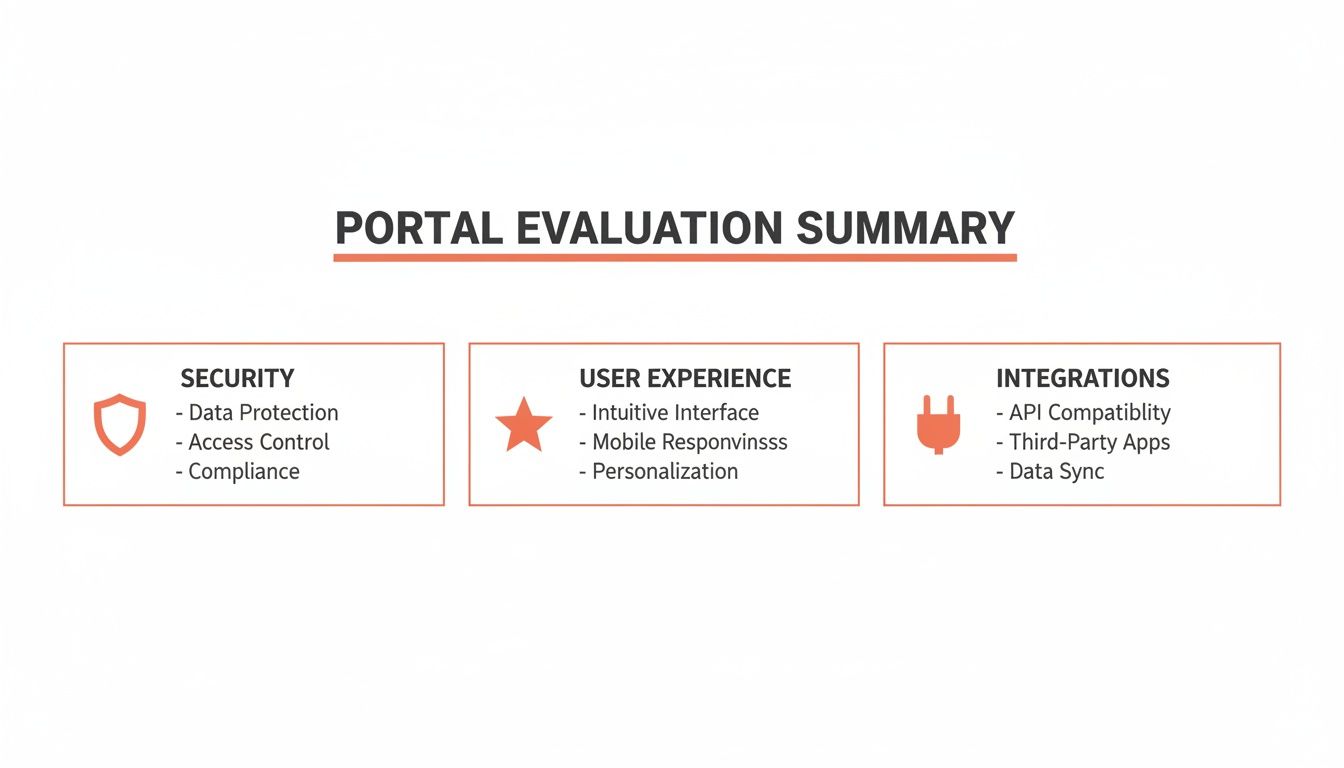
This image really gets to the heart of a solid evaluation. You need a balance of all three pillars. A super-secure portal that clients hate using is just as useless as a beautiful one that doesn’t connect to your essential tools.
Client Experience and Onboarding
That first login is your client's first impression. A clunky, confusing process creates instant friction and doubt. A smooth, branded experience, on the other hand, immediately tells them they're in good hands.
RGK is obsessed with a frictionless client experience. The interface is intentionally clean and minimalist, so clients intuitively know what to do without needing a manual. Its white-labeling is deep, letting you create a portal that looks and feels like a natural extension of your own website—a must-have for reinforcing your brand.
Copilot also delivers a sleek, modern UI that most clients will find easy to use. Its approach is a bit different, though; it’s designed to be a beautiful front-end for all your other tools. This can sometimes make the experience feel a little less unified than a purpose-built platform like RGK, especially if you’re plugging in a lot of different services.
Client-Portal.io is a WordPress plugin, so the client experience is baked right into your website. For agencies already living and breathing WordPress, this is a huge plus because it's a familiar environment. The catch? The portal's performance and look are tied to your site's theme and other plugins, which can sometimes create inconsistencies.
SuiteDash is the powerhouse here, packed with the most features. That power, however, comes at the cost of simplicity. For a new client who just wants to find their latest invoice, the sheer number of options can be overwhelming. It’s incredibly customizable, but you'll need to invest significant time upfront to hide the complexity and create a streamlined view for your clients.
Project Management and Collaboration
Real collaboration is so much more than a shared folder. It’s a central hub for feedback, approvals, and status updates that keeps projects moving forward and everyone on the same page.
RGK tightly weaves project management with billing and communication, which is its secret sauce. You can map out a project, assign tasks, and have all the related invoices and message threads neatly organized in one client-specific space. This solves that classic agency headache where project details are in one system and billing talks are happening somewhere else entirely.
SuiteDash is a true all-in-one with seriously robust project management, including things like task dependencies, Gantt charts, and deep reporting. It’s a fantastic choice for agencies looking to ditch their scattered tech stack and run everything under one roof. Just be prepared for the learning curve—its power requires more team training to unlock.
Key Differentiator: While SuiteDash wants to replace your entire toolset, RGK focuses on perfecting the client-facing layer—billing, communication, and project visibility—while playing nice with the specialized internal tools you already know and love.
Copilot functions more like a central dashboard that pulls data from your existing PM tools like Asana or ClickUp. It doesn't try to be a project manager itself; it's the beautiful, simple interface clients use to see what’s happening. This is perfect for agencies who have their internal systems dialed in but need a much better way to present that information to clients.
Client-Portal.io offers some basic project management inside WordPress. It’s fine for simple, straightforward projects but doesn’t have the horsepower of dedicated platforms. Its real value is the convenience of keeping everything within your website's dashboard.
Billing and Financial Management
For any service business, getting paid is paramount. Your client portal has to handle billing with total reliability, whether it’s for one-off invoices, recurring retainers, or complex subscriptions.
This is where RGK really shines. It was built with agency billing in mind, offering powerful and flexible automation. Setting up tricky retainers, managing subscription tiers, and sending automated payment reminders becomes simple. The native Stripe integration guarantees a secure, professional payment experience for your clients, which means less admin work for you and better cash flow.
SuiteDash also provides a complete set of billing tools, from invoicing to subscriptions and payment tracking. Because it's an all-in-one, it connects billing directly to your projects and time tracking, giving you a full 360-degree view of your financials.
Copilot approaches billing through integrations. It gives clients a clean interface to view and pay invoices, but the heavy lifting of subscription logic and invoicing is handled by an external tool like Stripe. It’s a flexible model, but it also means you’re relying on a separate system for any advanced billing needs.
Client-Portal.io doesn't have native billing. It can integrate with various WordPress invoicing plugins, but this can lead to a fragmented setup. You'll have to manage and maintain multiple plugins to build out a complete billing workflow.
To help you see how everything fits together, here's a quick side-by-side look at the platforms.
Feature Comparison of Leading Client Portal Software
| Feature | RGK | Copilot | Client-Portal.io | SuiteDash |
|---|---|---|---|---|
| Primary Focus | Client Experience & Billing | Universal Client Interface | WordPress Integration | All-in-One Business OS |
| Onboarding UX | Highly Streamlined | Modern & Intuitive | Familiar (WordPress) | Feature-Rich, Can be Complex |
| White-Labeling | Extensive | Strong | Dependent on Theme | Highly Customizable |
| Native Billing | Advanced (Subscriptions) | Via Integration | Via Plugins | Comprehensive |
| Best For | Service agencies needing polished client interactions and automated billing. | Agencies wanting a beautiful front-end for their existing tools. | Agencies fully committed to the WordPress ecosystem. | Agencies wanting to consolidate all business functions into one platform. |
Ultimately, the best client portal software comes down to your agency's unique structure and priorities. If your main goal is a polished, brand-centric client experience powered by effortless billing automation, RGK is a top contender. If you’re looking for a single, all-encompassing system to run your entire operation, SuiteDash offers unmatched breadth.
Why Service-Based Agencies Are Choosing RGK
Most platforms out there try to be everything to everyone. RGK isn't one of them. It's purpose-built for service agencies, with a sharp focus on nailing the client experience—from billing and onboarding to everyday communication. This commitment makes it a top contender for the best client portal software for any agency that wants to look polished, organized, and professional.
RGK's real power is its clean, deeply white-labeled interface. It's designed to feel less like a piece of software you bought and more like a custom-built part of your own brand. That's a huge deal. When clients log into a portal with your logo, your colors, and your custom domain, it builds trust and makes your whole operation feel seamless. The idea is to get rid of any hint that they're using a third-party tool.
Mastering Agency Billing and Retainers
Let's be honest, billing can be a real headache for agencies. Chasing down payments, juggling retainers, and processing subscription changes eats up a ton of non-billable time. RGK was clearly built by people who get this, offering a native billing system designed for how agencies actually work.
It's fantastic at putting recurring revenue on autopilot. Whether you're dealing with monthly SEO retainers, different support packages, or just one-off project invoices, the platform makes it all straightforward.
- Subscription Management: You can quickly set up different service tiers and let clients upgrade or downgrade on their own—no back-and-forth emails required.
- Automated Invoicing: Just set up recurring invoices once. They’ll go out automatically, complete with payment reminders to keep your cash flow healthy.
- Secure Payments: The built-in integration with Stripe gives clients a secure, easy way to pay, which goes a long way in speeding up payments.
By automating the billing grunt work, your team gets to focus on what clients are actually paying for: delivering great work. It turns a classic operational bottleneck into a smooth, reliable process.
Creating Frictionless Client Onboarding
Those first few weeks with a new client are critical. A messy, confusing onboarding experience can plant seeds of doubt before you’ve even started the real work. RGK is built to make that initial phase feel effortless and consistent.
You can create automated onboarding flows right inside the portal. As soon as a new client signs up, the system can kick off a pre-defined sequence of welcome messages, tasks, and requests for files or information. This guarantees every client gets the same high-touch, organized start.
RGK transforms onboarding from a manual to-do list into an automated, branded experience. It immediately shows clients your agency is organized, efficient, and on top of its game.
For example, a digital marketing agency could use RGK to set up an onboarding flow that automatically does the following:
- Sends a welcome message introducing the core project team.
- Requests access to social media or analytics accounts through a secure, built-in form.
- Assigns the client their first task, like filling out a brand discovery questionnaire.
- Provides a link to schedule their kickoff call.
This isn't just about saving time; it's about proving your agency’s competence and professionalism from day one.
The Verdict on RGK
RGK isn't trying to replace every tool in your tech stack. It deliberately avoids the bloat of an all-in-one system. Instead, it focuses on perfecting the client-facing part of your business—the part that directly shapes how clients see you and whether they stick around.
For service agencies wrestling with scattered communication, clunky billing, and chaotic onboarding, RGK is an incredibly polished solution. Its dedication to a clean, white-labeled client experience and its smart automation for agency-specific workflows make it a powerful choice for any team ready to level up their service delivery. If improving client relationships and streamlining how you get paid are your top priorities, you need to give RGK a serious look.
A Practical Guide to Portal Implementation and Migration
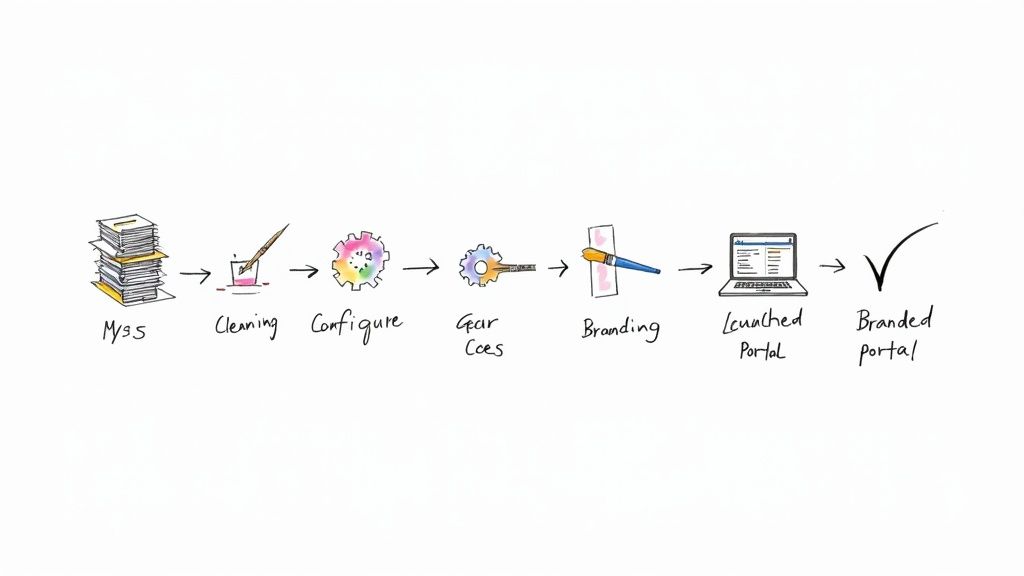
Picking the right client portal software is a huge step, but the real work begins with implementation. I've seen agencies invest in a great tool only to have it fall flat because the rollout was rushed or disorganized. A clumsy launch creates chaos for your team and frustrates your clients, which is the exact opposite of what you’re trying to accomplish.
Whether you're setting up your first portal or moving away from an old system, you need a solid plan. A successful switch comes down to three things: getting your data ready, setting up the system thoughtfully, and communicating clearly with your team and clients.
Getting Your Data and System Ready
Before you import a single client file, you have to get your own house in order. This cleanup phase is honestly the most important part of the whole process. Get it right, and you’ll save yourself from a world of hurt later. Think of it as a chance to finally archive those ancient projects and get your data consistent.
Start by going through all your client info, project files, and communications. You need to decide what’s coming over to the new portal, what can be archived, and what’s just digital junk. This isn't just about being tidy; clean data makes the new system fast and easy to use from the moment you go live.
With your data sorted, it’s time to configure the portal itself. This goes way beyond just sticking your logo on the login page. The real work is in defining user roles and permissions with precision.
- Define User Roles: Map out specific roles for your internal team—think Project Manager, Designer, or Accountant—and for your clients.
- Set Granular Permissions: Figure out who can see what. A project manager might need access to everything, but a client should only ever see their own projects, files, and invoices.
Getting these permissions right is non-negotiable. It’s the key to keeping information secure and preventing a client from accidentally stumbling into another client's project folder.
Executing a Smooth Rollout
Once your data is clean and your permissions are locked in, the focus shifts to the people. How you introduce this new portal to your team and clients will make or break its adoption.
Your team needs to be the experts before anyone else. Run hands-on training that walks them through the exact workflows they’ll use every day, like setting up a new project or sending a client a message. If they're confident, they can help your clients feel confident, too.
Pro Tip: When you introduce the portal to clients, sell it as an upgrade for them, not a new hoop they have to jump through. Talk about the benefits they get: better security, 24/7 access to their files, and one central place for all communication.
Your communication plan needs to be simple and proactive. Don't just blast out an email with a login link and call it a day. A simple launch sequence works wonders:
- Announce the Change: A week or so before launch, send a heads-up email explaining the new portal and why it’s going to make their life easier.
- Provide Onboarding Materials: On launch day, give them a short video walkthrough or a simple one-page guide. Show them how to log in and do the most common tasks.
- Offer Support: Make it obvious who they should contact with questions. Be ready to provide quick, friendly help for the first few weeks as everyone gets settled.
By being deliberate about your data prep, system setup, and communication, you can get your new portal adopted quickly. Before you know it, it’ll become an essential part of how you deliver amazing service to your clients.
Time to Make the Call: Choosing Your Client Portal
Alright, you’ve done the heavy lifting. You've waded through the features, put the big names head-to-head, and now you know what really matters in a client portal. The final step isn't just about picking a tool; it's about choosing an operational partner that will grow with your agency.
Let’s move from theory to a confident decision. The best way to do this is to get practical. I always recommend a simple decision matrix. Just list your must-haves—maybe it's bulletproof billing automation or seamless white-labeling—and score each platform. This simple exercise cuts through the marketing noise and focuses you on what your agency actually needs.
Your Final Gut-Check Checklist
Before you sign on the dotted line, run through this quick checklist. Think of it as the last step to make sure you’ve covered all the angles.
- Walk Through Your Key Workflows: Get specific. Map out your top three client interactions, like onboarding a new account, getting project sign-offs, and handling monthly billing. Which platform makes those exact steps feel effortless?
- Evaluate the Client's View: Have a couple of team members demo your top two choices, but purely from a client's perspective. Is it easy to navigate? Does it feel like a professional, secure space you’d be proud to put your name on? Remember, a portal clients hate is a portal they won't use.
- Pressure-Test for Growth: Grill the vendors with real-world scenarios. What happens to our bill when we add 20 new clients? How easy is it to grant temporary access to a contractor? Make sure their model fits where you’re going, not just where you are.
A great client portal is more than software—it's a core part of your client experience. It directly shapes your agency's efficiency, brand, and ability to keep clients happy. Pick the one that helps you deliver the service you're known for.
This isn't just an internal debate; it's happening in a massive market. The client portal software market is valued at USD 7.4 billion globally in 2024, with North America accounting for USD 3.5 billion of that. This concentration means the most competitive, agency-centric features often come from vendors in this region. You can get a better sense of where things are headed by looking at the latest client portal market trends.
By focusing on your real-world workflows and pushing vendors on the tough questions, you turn a potentially overwhelming choice into a smart, strategic investment for your agency's future.
Frequently Asked Questions
When agencies start digging into client portals, a few key questions always pop up. It's totally normal to wonder about pricing, how to get clients to actually use the thing, and how it's different from the tools you already have. Let's clear those up.
What Are Typical Pricing Models
When you start shopping for the best client portal software, you'll run into a few common ways vendors structure their pricing. Most use a tiered system, where you pay more to unlock better features like full white-labeling or advanced automation.
You'll also see per-seat pricing, which is fine for a small team but can get expensive fast as you bring on more people. Then you have platforms like RGK, which build their pricing around how agencies actually work—giving you a core team and the freedom to add contractors without racking up a huge bill for every single user.
How Can I Ensure High Client Adoption
Getting clients on board with a new portal is all about how you frame it. If the rollout feels like a chore, they won't use it. Simple as that. The secret is a proactive, simple communication plan that sells them on the benefits.
Instead of just sending an invite, focus your message on what's in it for them:
- Enhanced Security: Their sensitive documents are finally in one secure, professional place.
- 24/7 Access: They can grab project files, check invoices, or review updates whenever they want, no waiting required.
- Centralized Communication: No more searching through a year's worth of emails to find that one piece of feedback.
A quick video tour or a one-page PDF can make a world of difference. When you sell the why, the portal becomes a genuine perk of working with you, not just another login they have to remember.
A successful launch isn't just about sending a login link. It's about demonstrating how this new tool makes their life easier and their projects run smoother, reinforcing the value you provide.
Ready to deliver a seamless, professional experience your clients will love? See how RGK can automate your billing, streamline onboarding, and put your brand front and center. Explore RGK today.