Customer Service SOP Template for Streamlined Support


A customer service SOP lays out every action your support team should take to resolve customer issues. With a clear playbook in hand, agents follow the same reliable steps every time. That consistency speeds up onboarding and trims down avoidable mistakes.
Why Use A Customer Service SOP Template
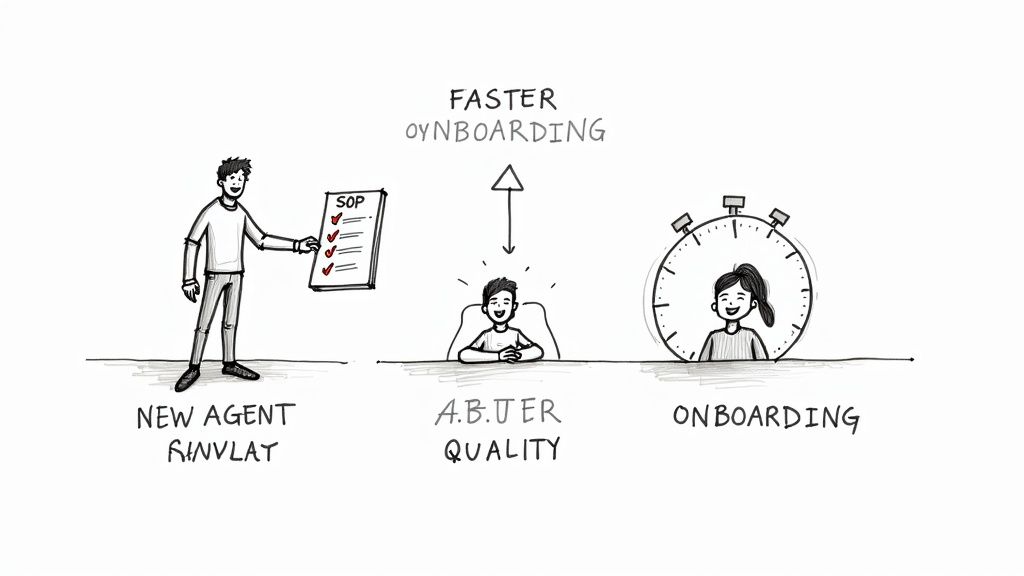
Embedding a reliable process into everyday operations makes a visible difference.
- Faster onboarding – new agents hit targets in days, not weeks.
- Reduced errors – clear steps and defined roles can cut mistakes by 30% in the first quarter.
- Consistent service quality – standardized replies build trust and boost satisfaction.
In my time working with agencies, I’ve seen teams halve their error rates simply by weaving in checkpoints and role approvals right into the SOP.
Real Agency Example
BrightWave’s team adopted this structure and saw ticket-handling mistakes drop by 50% within three months.
What You’ll Learn
This guide walks you through each phase of making an SOP that sticks:
- Customizing Sections: Define ticket categories, service tiers, and AI routing rules for seamless triage.
- Designing Escalation Flows: Set SLA timers and trigger points so nothing falls through the cracks.
- Training And Adoption: Run hands-on workshops, record video demos, and stage role-plays that build real confidence.
- Measuring Success: Track CSAT, AHT, FCR on dashboards and tweak your playbook based on the data.
These steps ensure your SOP evolves alongside your agency’s growth.
Key Outcomes
Once your team owns this template, expect to see:
- 50% Faster Onboarding: Time to full proficiency drops in half.
- 30% Error Reduction: Fewer escalations and smoother handoffs improve resolution rates.
- Higher CSAT Scores: Uniform answers consistently lift customer satisfaction.
What Comes Next
You’ll get in-depth walkthroughs on mapping ticket types, assigning roles, defining escalation triggers, building a training curriculum, and tracking KPIs.
- Grab your free SOP template and start cutting errors today—and every day after.
Key Elements Of A Customer Service SOP Template
A strong SOP template is the backbone of consistent support delivery. When naming conventions and clear objectives fall into place, agents step into each process without second-guessing.
Defining Title And Purpose
Every SOP needs a straightforward title paired with a concise purpose statement. This quick overview ties each procedure to a business goal and clarifies the customer outcome you’re working toward.
Setting Scope And Audience
Drawing sharp boundaries around who follows which workflow prevents off-script replies. By listing supported channels, ticket types, and departments, you keep agents focused on the right tasks at the right time.
Assigning Roles And Responsibilities
Pinpointing who does what at each stage cuts down handoff confusion. Level 1 agents can handle initial triage, while Level 2 specialists tackle deeper issues. This division speeds up resolution and keeps accountability crystal clear.
Mapping Procedures
Lay out each process step as if you’re guiding a teammate through it.
- Keep language simple and direct
- Stick to action verbs like Verify, Escalate, and Document
- Link to screenshots or the relevant tool whenever it helps
Agents will thank you for a roadmap they can skim in seconds.
Embedding Quality Checkpoints And Escalation Triggers
Sprinkle in QA reviews at critical handoff points to capture errors before they go live. One agency added a weekly audit and lifted CSAT by 7% within two months. Escalation triggers—based on response time or priority—ensure no ticket sits unnoticed.
Learn more about these findings on SowFlow
Scheduling Review Cadences
An SOP that never sees an update is just a dusty binder on the shelf. Block out quarterly reviews tied to Average Handle Time (AHT) and First Contact Resolution (FCR) to pull outdated steps out of circulation.
“Regular refreshes maintain accuracy and boost team confidence in documented workflows.”
RGK clients run quarterly editorial sprints, folding frontline feedback into each version. Teams tracking the impact often register a 30% drop in errors after a full SOP rollout.
Before you dive into customization, here’s a quick comparison of the core building blocks every SOP needs:
Core SOP Template Sections
| Section Name | Purpose | Key Details |
|---|---|---|
| Title and Purpose | Define objective | Mission statement and goals |
| Scope and Audience | Identify who and when | Channels, ticket types, departments |
| Roles and Responsibilities | Assign ownership and handoffs | Agent tiers, RACI chart |
| Procedures | Lay out clear steps | Numbered lists, tool references |
| Quality Checkpoints | Monitor and audit | QA criteria, review frequency |
| Escalation Triggers | Route urgent issues | Thresholds, routing paths |
| Review Cadences | Keep content updated | Schedule, owner, revision logs |
Use this table as your blueprint. Fill each row with your agency’s specifics to turn a generic outline into an actionable playbook.
Below is a screenshot showing how customizable fields appear in the SOP template.
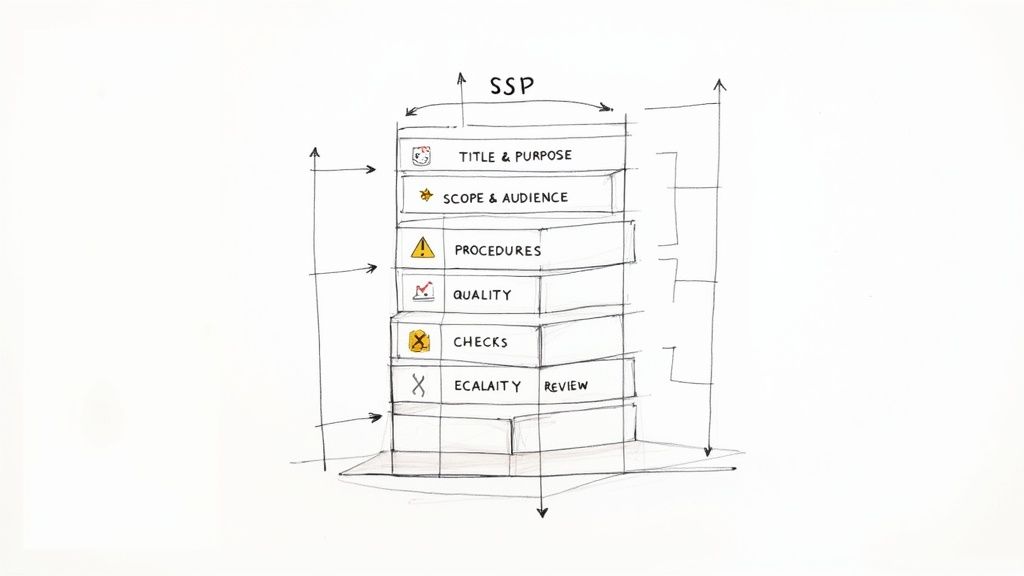
This visual highlights clear section headers and handy fill-in guidance that keep agents on track.
Integrating KPIs With SOP Sections
When you peg each SOP block to a metric, every workflow step has a measurable goal. For example, your live-chat procedure might carry a 2-minute response target while quality checks aim for a 95% QA pass rate.
Align roles to those same figures and watch underperformers flag themselves early.
- Set CSAT benchmarks for each interaction
- Define AHT ceilings by ticket category
- Track FCR rates per agent level
- Monitor SOP compliance percentages
Ongoing KPI reviews turn your SOP from a static document into a dynamic performance engine.
Avoiding Common Template Pitfalls
Crushing every edge case into one document only invites overwhelm. Instead, carve out modular sections or decision trees for rare exceptions.
Skipping routine updates is an even bigger risk. Tie each revision to a simple root-cause log so you know why changes happened and avoid reworking the same edits.
Every agency starts with a baseline SOP. Adapt it to your own workflows, and you’ll end up with a playbook that agents can follow at a glance.
Customize Your Template For Agency Workflows
No two agencies move at the same pace. That’s why your SOP needs to reflect real ticket journeys, not some generic outline. Start by pinpointing your most common ticket types and pairing them with service tiers. This way, agents find exactly what matters when they open a new ticket.
Map each issue category to its specific workflow. That cuts down on confusion and speeds up resolutions.
- Billing inquiries often call for access to invoice logs, payment histories, and approval steps.
- Technical hiccups require system status checks, user environment details, and clear escalation paths.
- Account updates demand verification, permission audits, and update logs.
Define Ticket Categories And Service Tiers
Group your tickets into Standard, Priority, and Enterprise lanes. Assign clear response and resolution targets for each level.
With smart routing in place, manual triage shrinks by up to 40% in busy inboxes. Plus, service tiers guide smooth handoffs between front-line agents and specialists—no more dropped tickets.
Customize AI Routing Rules
Let machine learning do the heavy lifting for ticket sorting. Train your AI on historical data so keywords around billing, tech issues, or account changes automatically land in the right queue.
Next, set up routing thresholds that send high-value clients straight to senior agents. Use natural language processing to flag urgent or negative sentiment. Review those routing reports weekly to catch misclassifications early.
Document Handoff And Escalation Workflows
Make every transition crystal clear. Spell out when a front-line agent should loop in a specialist—whether it’s due to severity, customer value, or an SLA breach.
Build automatic triggers that escalate tickets over time. For instance, if a priority bug isn’t fixed within 30 minutes, it jumps to the next support tier.
“Aligning escalation points to customer impact stops minor issues from becoming crises.”
Detail the decision criteria so every agent knows when it’s their turn to act. This clarity boosts both accountability and customer confidence.
Here is a screenshot showing benchmarks across channels
This visual highlights industry targets for response speed and satisfaction by channel.
Align SOP Targets To Channel Benchmarks
To set realistic goals, lean on industry data. Below is a quick reference for response time targets and satisfaction rates across channels:
Channel Benchmarks For Response And Satisfaction
This table outlines expected performance levels so your team can hit—and exceed—them consistently.
| Channel | Response Time Target | Satisfaction Benchmark |
|---|---|---|
| Phone | 30 seconds | 91% |
| Live Chat | 1 minute | 87% |
| 4 hours | 82% |
These benchmarks act as guardrails. Animate them in your dashboard so agents can track progress at a glance.
Sample Workflow From Shoreline Media
At Shoreline Media, live chat response time dropped from 120 seconds to 60 seconds after they aligned every SOP step to channel benchmarks.
They nailed it by:
- Crafting clear checklists at each stage
- Using timer cues in their scripts
- Trimming nonessential questions
- Leveraging canned responses for common queries
Dive deeper into customer service statistics at Text.com’s blog on CS stats.
Once you map your own benchmarks, swap in your tool names, roles, and timing rules.
• Tag the ticket by channel and tier
• Assign it to a first responder right away
• Populate key fields like account ID and urgency
• Route to a specialist when criteria are hit
• Send customers status updates at every milestone
Finalize And Iterate Your Agency Template
Roll out your draft SOP to a small cross-functional team and collect feedback on clarity, timing, and tool links. Keep a version log to record why each tweak happened. Schedule quick monthly check-ins to adjust for new scenarios and edge cases.
Continually refresh your template with fresh examples. Living documentation beats memory every time—and fewer errors mean happier customers.
Monitor And Optimize Continuously
Automate weekly reports on CSAT, AHT, and FCR to spot emerging trends. Dashboards help teams see real-time performance and flag tickets that miss SLA targets.
- Highlight missed SLAs for immediate review
- Track escalation frequency and resolution rates to fine-tune triggers
Continuous improvement is key to sustained service excellence.
With standardized workflows and clear benchmarks, your agency will deliver faster responses and higher satisfaction—every time.
Implement Handoff And Escalation Workflows
Every ticket deserves attention—and a solid escalation map makes sure nothing slips through the cracks. By defining clear handoff rules and SLA clocks in your customer service SOP, you keep urgency front and center and set expectations for every team member.
Here’s an infographic illustrating how ticket types route through your decision tree based on topic and urgency.
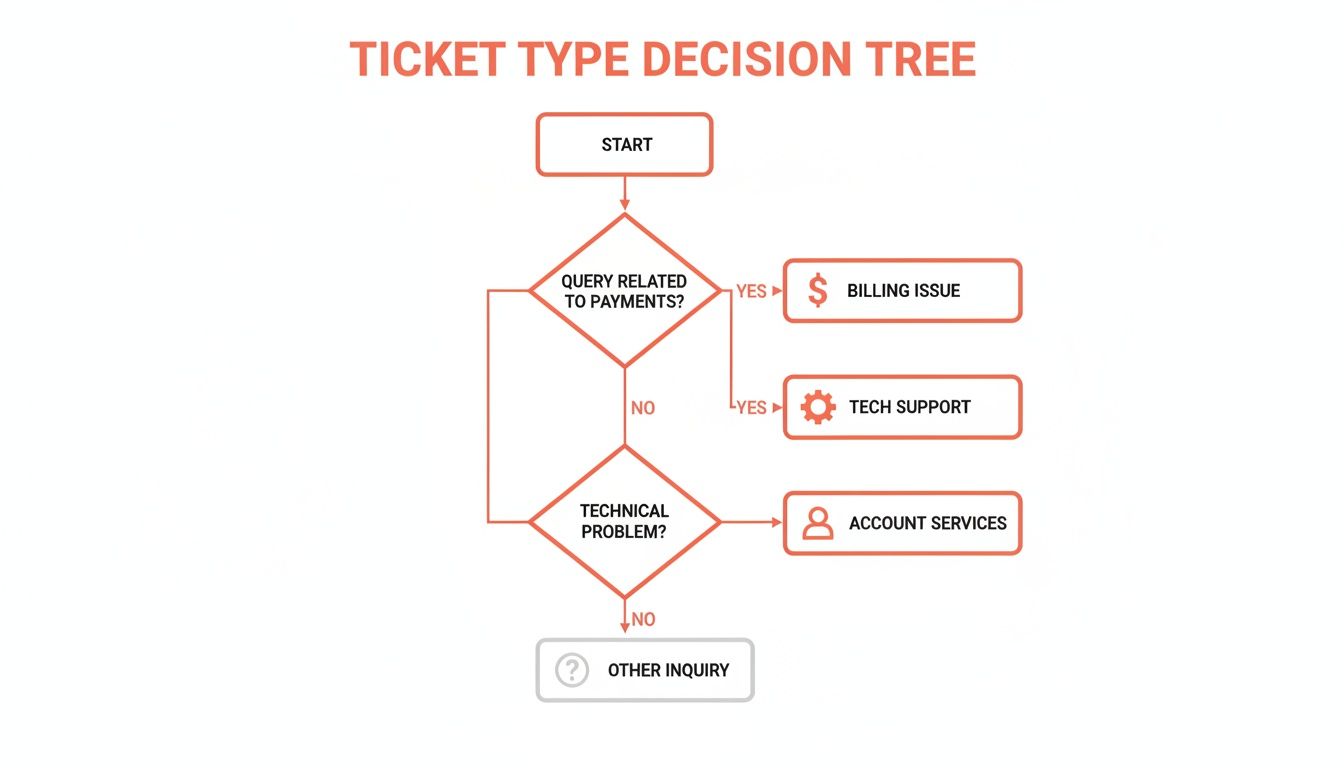
In this diagram, Billing tickets head straight to finance specialists, Tech issues land with engineers, and Account queries go to client managers. Priority tiers trigger escalations whenever timers hit their thresholds.
Naming Triggers And SLA Clocks
Clarity in labels stops confusion when agents flip through the SOP. I recommend using action-oriented titles like Urgent Billing Escalation or Tech Tier 2 Handoff.
- Use start points such as ticket creation at 0 minutes
- Set escalation thresholds (for example, 30 minutes for priority, 2 hours for standard)
- Assign a single owner at each stage so someone’s always accountable
Documenting Handoffs Clearly In Template
When you spell out handoffs, tie each step to a role and a system action. At NovaTech Support, we wrote:
“If a response lag exceeds 45 minutes, reassign to Senior Agent.”
“Our decision tree cut missed SLAs by 60% in two months,” recalls NovaTech’s support lead.
To keep things scannable, use bullet points instead of long paragraphs:
- Tag the ticket with category and priority
- Start the SLA clock at the moment of initial assignment
- Escalate to Level 2 as soon as the timer hits its threshold
- Push a status update to the customer at every handoff
Testing And Validating Escalation Flows
You don’t want surprises after launch. Build a test plan that throws dummy tickets with different categories and urgencies at your workflow. Compare actual routes against your decision tree and log any mismatches for quick fixes.
| Ticket Type | SLA Threshold | Next Tier Owner |
|---|---|---|
| Billing | 30 minutes | Finance Team |
| Tech | 45 minutes | Engineering |
| Account | 1 hour | Account Manager |
Regular testing and feedback loops refine your escalation workflows and prevent surprises in live environments.
Run monthly drills where agents role-play tricky scenarios, flag unclear steps, and suggest tweaks. This hands-on approach sharpens the process under real-world pressure.
Common Mistakes To Avoid In Escalation
- Defining roles too broadly, leaving agents guessing ownership
- Relying on judgment calls instead of concrete timers
- Omitting clear contact details for the next-tier owner
- Designing overly complex trees that get skipped in a rush
Best Practices For Ongoing Monitoring
Keep an eye on SLA compliance every week so small delays don’t turn into big backlogs. Set up dashboard alerts for tickets nearing their thresholds—this gives you breathing room to adjust or reallocate resources.
Agents empowered with real-time SLA alerts resolve 28% more tickets before escalation, according to internal RGK data.
Quarterly audits bring fresh eyes to your workflows. Involve frontline staff in review sessions to capture those edge-case scenarios. After all, nobody knows the pain points better than the people handling tickets day in, day out.
Next Steps Before Rollout
Before you hit “publish,” tie up these loose ends:
- Send the final SOP to all team members
- Host a brief Q&A session to address last-minute questions
- Schedule a review in three months to keep the document current
With a polished escalation blueprint in place, tickets move smoothly through tiers, agents stay calm under pressure, and customer satisfaction climbs.
Integrate Workflows With RGK Platform
Finally, hook your escalation rules into RGK’s automation platform so triggers fire without manual intervention. This integration saves agents an average of 15 minutes per ticket and logs each handoff for clear audit trails.
Automation paired with crystal-clear processes ensures your team resolves issues quickly and consistently.
Train Your Team With The SOP Template
Getting your team to embrace an SOP requires more than handing over a document. When you weave the template into everyday routines, consistency becomes second nature. Small, experiential exercises spark that “aha” moment and turn abstract steps into habits.
Interactive Learning Workshops
To kick things off, break agents into groups of three or four. Give them live ticket simulations and watch as they navigate the template together.
- Simulate incoming tickets with varying levels of complexity
- Rotate roles between agent, customer, and observer
- Debrief on best practices and note any confusing instructions
This format uncovers ambiguities right away and invites the team to fine-tune the process. Plus, everyone feels ownership over the final SOP.
Bite-Sized Video Demonstrations
Long training sessions can overwhelm. Instead, record short clips that walk through each section of the SOP. Agents can revisit these snippets whenever they hit a snag.
- Capture workflows for billing, technical support, and account updates
- Emphasize metrics like 90% first-contact resolution targets
- Include captions and timestamps that link back to specific template sections
These on-demand videos serve as quick reminders and slash follow-up questions about procedures.
Role-Play Scenario Practice
Nothing beats real-world rehearsal. Scripted calls or chats give agents a safe space to practice challenging interactions. Pair newcomers with mentors for an extra layer of guidance.
A mid-size agency we worked with ran a peer-mentoring pilot and saw SOP adherence jump by 20% within eight weeks. Agents also reported feeling more confident when handling escalations.
- Craft scripts that feature angry or confused customers
- Encourage improvisation once the basic dialogue is mastered
- Offer immediate feedback and discuss alternate approaches
“Regular scenario training lets our team tackle weird edge cases before they hit live queues.”
Building Coaching Checklists And Quizzes
Simple tools help coaches stay on track during live calls. Quizzes verify that every agent knows those critical decision points inside out.
- Develop a checklist aligned with each SOP section
- Draft multiple-choice questions around key triggers and quality checkpoints
- Review quiz results weekly and refine the SOP wherever gaps appear
Examples include items like “verify account status” or “confirm SLA tier” and quiz topics on escalation rules and response-time targets.
Scheduling Quarterly Refresh Sessions
Processes evolve, and your training should keep pace. Set aside time every three months for structured updates.
| Refresh Activity | Purpose | Frequency |
|---|---|---|
| Full Team Workshop | Introduce updates and collect feedback | Quarterly |
| Microlearning Sessions | Targeted reviews for specific teams | Monthly |
| Peer Review Roundtables | Share real success stories and pitfalls | Quarterly |
Wrapping up each session with a quick pulse survey shines a light on lingering questions. That way, new hires and tenured agents stay on the same page.
Integrating Feedback Loops
Turn every suggestion into an opportunity. When agents flag unclear steps, they add notes to a shared document that feeds into your next workshop.
- Provide a simple form for agents to highlight missing details
- Review submissions bi-weekly and prioritize changes by impact
- Bring fresh insights into each quarterly session
This routine boosted our SOP adoption to 95% on time and cut support escalations by 15% in one quarter.
Tracking Training Effectiveness
You can’t improve what you don’t measure. Keep an eye on knowledge-check scores and quality audits to see where coaching is working—and where it needs a boost.
- Monitor quiz pass rates, aiming for 80% or higher
- Randomly sample call recordings for monthly quality reviews
By linking performance data back to your SOP, you’ll ensure every training dollar you spend drives real-world results.
Measure Performance And Refine Your SOP
I always treat the SOP as a living document, not a one-and-done. Tracking performance highlights hidden bottlenecks and shows where processes need a tweak.
Dashboards bring CSAT, AHT, FCR, compliance rates and overall adherence into a single view. When you see a trend shift, it’s easy to zero in on the culprit.
Tracking Essential Metrics
Every metric tells its own part of the story. Not long ago, a dip in first-contact resolution sent us straight to our call scripts—and we fixed a greeting that confused new agents. In no time, 73% of users praised faster, clearer answers.
- CSAT: Customer satisfaction after each interaction
- AHT: Average handling time per ticket
- FCR: Percentage resolved on first contact
- Compliance Rate: How closely agents follow your SOP
These figures point you exactly where to sharpen training or clarify steps.
Automating Weekly Reports
Manually pulling reports can eat up half a day. Automate the process once and let it deliver every Monday—no oversight needed.
- Connect ticketing systems with your survey tool
- Schedule report delivery and assign recipients
- Set alerts for any outlier values
- Publish results to dashboards or email digests
This setup frees managers to interpret trends instead of wrangling data.
Insightful trends reveal root causes faster than any manual audit.
Spotting Friction Points
A sudden spike in AHT or dip in CSAT rarely happens by accident. In one holiday season, a staffing gap drove CSAT down—quick hires without proper onboarding created confusion.
- A surge in AHT when new agents lack shadowing
- CSAT drop during peak periods with understaffing
- Low compliance on complex steps without clear examples
Identifying these friction points lets you apply laser-focused fixes.
Case Study On Escalation Tweaks
We once adjusted escalation thresholds from 30 to 45 minutes at a midsize agency. That change sparked a 15% boost in FCR and cut back on premature handoffs.
| Metric | Before Tweak | After Tweak |
|---|---|---|
| First Contact Resolution | 68% | 83% |
| Escalation Volume | 12% | 8% |
A small shift, big payoff.
Quarterly Review Checklist
Every three months, gather your team and run through a quick audit to keep the SOP fresh.
- Collect frontline feedback via short surveys
- Audit a random sample of 20 tickets for compliance
- Scan dashboards for any metric regressions
- Host a workshop to prioritize updates
Monitoring Compliance And Adherence
Spotting who skips SOP steps can reveal training blind spots. We once discovered a confusing section when multiple tickets flagged the same missing action.
- Track tickets missing required steps
- Monitor deviation frequency by agent
- Chart audit scores over time
A clear compliance dashboard guides targeted coaching and quick documentation fixes.
Integrating Frontline Feedback
Your agents see SOP blind spots first. Turning their anecdotes into formal updates keeps the guide practical—and earns their buy-in.
- Send monthly feedback forms with open-ended questions
- Hold focus groups around recent ticket samples
- Route collected insights to the SOP owner
Agents love seeing their suggestions in the next iteration—adoption soars.
Next Steps For Ongoing Improvement
An SOP thrives on continuous tweaks. By closing the loop on feedback and metrics, you build a culture of excellence and keep customer satisfaction climbing. Over time, this iterative rhythm cements your SOP as the go-to playbook for high-quality support.
Frequently Asked Questions
Every thriving agency relies on a well-crafted SOP. It cuts through confusion and speeds up each support interaction.
Below are the top questions agencies ask—and practical advice to make your SOP a true productivity booster.
What Should A Template Cover To Truly Streamline Support?
A strong customer service SOP starts by defining what you’re solving for—and who owns each part of the process. Clear handoff rules and quality checkpoints keep tickets moving without stalls.
- Purpose and Scope outline goals and boundaries.
- Roles and Responsibilities assign each task to a point person.
- Procedures use crisp, action-focused verbs.
- Escalation Triggers set precise handoff timings.
Embedding QA steps cut error rates by 30% in two months.
This kind of built-in checklist makes every step predictable.
Tools To Enforce SOP Adherence
An SOP on Google Docs only goes so far. You want tools that enforce the rules as you work.
- Workflow Automation routes tickets automatically by status or timer.
- Chatbot Integrations capture vital details before agents dive in.
- Version Control logs updates and lets you roll back changes.
What Are Best Practices To Balance Standardization With Flexibility?
Too much rigidity frustrates agents. Too little structure invites chaos. A modular approach keeps you nimble.
- Core Sections address the bulk of common requests.
- Exception Modules kick in for edge-case scenarios.
- Decision Trees guide reps through unusual workflows.
- Notes On Edge Cases flag VIP or compliance-critical tickets.
For example, one boutique agency built a GDPR-specific mini-module that triggers only when privacy keywords pop up—keeping their main SOP uncluttered and compliant.
Updating Your SOP Regularly
An SOP isn’t a “set it and forget it” document. Tie updates to real-world signals and team feedback.
| Review Type | Trigger | Frequency |
|---|---|---|
| Performance Audit | CSAT or AHT shifts | Quarterly |
| Quick Patch | Critical gaps found | As Needed |
Continuous tweaks keep your SOP aligned with day-to-day reality.
That ongoing attention turns your SOP into a living, reliable guide.
Ready to elevate your support game? Get started with RGK.