10 Agency-Tested Client Communication Best Practices for 2025

Running an agency often feels like finding 10,000 ways that won't work, especially with client communication. Disconnected tools-CRM, project management, email, Slack-create information silos and operational chaos. This forces your team into constant fire-fighting mode instead of strategic work.

This isn't just inefficient; it's a direct drain on profitability and a cap on your ability to scale. The solution isn't another Zapier integration or a more complex spreadsheet. It's about building an intentional, unified communication operating system. Poor communication leads to missed deadlines, scope creep, and ultimately, client churn. The cost of acquiring a new client is far greater than retaining an existing one, making effective communication a critical factor for financial health.

This guide moves beyond generic advice to provide ten specific, actionable client communication best practices that high-performing agencies use to eliminate chaos. We will detail how to establish a single source of truth, implement structured intake processes, and create transparent escalation paths. You'll learn how to build unbreakable client trust and create a scalable foundation for growth, not by adding more tools, but by fundamentally improving your operational framework. Forget vague tips; we're focusing on concrete systems you can implement immediately. These strategies are designed to free your team from administrative overhead, allowing them to focus on delivering exceptional value and strengthening client relationships.

1. Unified Communication Hub & Single Source of Truth

Scattered client conversations across email, project management tools, and chat apps create information silos that lead to missed details and inconsistent service. A unified communication hub centralizes all client interactions, creating a single source of truth where every team member has full context, regardless of the channel used. This consolidation is a cornerstone of effective client communication best practices, ensuring nothing falls through the cracks.

By integrating channels like email, support tickets, and direct messages into one platform, your team gets a complete, chronological view of every client relationship. This eliminates the need to hunt for previous conversations or key documents, empowering anyone on your team to step in and provide informed, consistent support at a moment's notice.
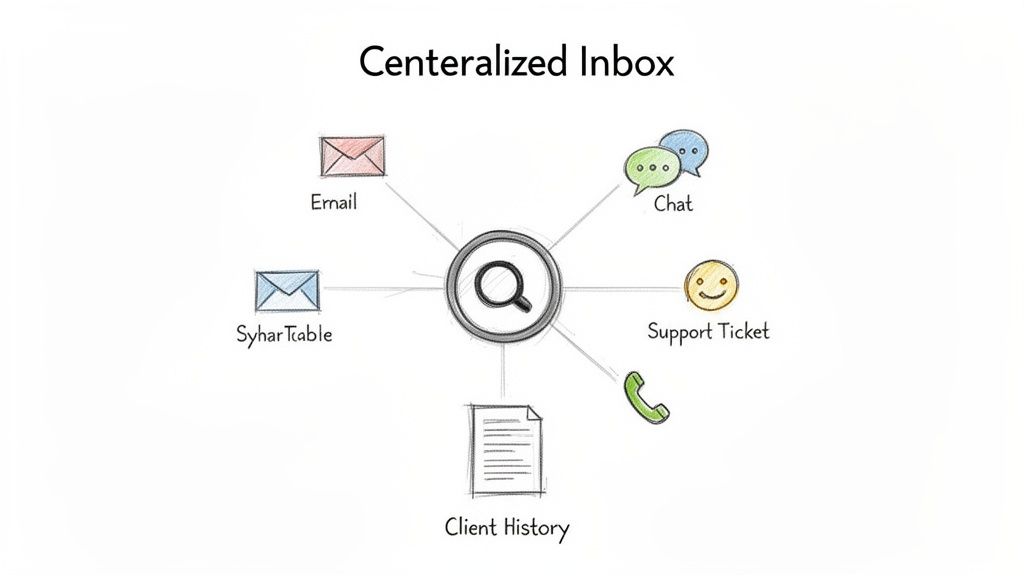
Diagram showing a centralized inbox integrating email, chat, support tickets, and client history.

Why It Works & How to Implement It

A unified hub transforms reactive communication into a proactive, strategic function. When HubSpot integrated its CRM with email, chat, and ticketing, it allowed sales, service, and marketing teams to access the same client history, creating a seamless customer journey. This approach prevents clients from having to repeat themselves and ensures every interaction builds upon the last.

To implement this effectively:

  • Conduct a Channel Audit: Start by mapping out every channel your team currently uses to communicate with clients (e.g., shared inboxes, Slack Connect, Asana comments).
  • Establish Clear Protocols: Define which types of communication belong in which channel, even within a unified system. For example, use a ticketing system for technical support and a project management tool for task-specific feedback.
  • Automate Message Routing: Set up rules to automatically assign incoming messages to the correct team or individual based on keywords, client type, or urgency.
  • Integrate Your Data: Ensure your communication platform syncs with your CRM and project management tools. This provides crucial context, like project status or contract details, directly within the communication thread.

2. AI-Powered Context-Aware First Response

Manually handling every client inquiry drains valuable team resources, especially when many questions are repetitive. AI-powered first responses leverage systems that understand your complete client history, project context, past tickets, and internal knowledge bases to draft intelligent, personalized replies. This approach multiplies your team's capacity, automating routine communication while ensuring every response is accurate and context-aware. It’s a critical component of modern client communication best practices that allows your team to focus on high-value strategic work.

By training an AI on your agency's unique data, from SOPs to past successful client interactions, you create an assistant that can instantly surface relevant information or draft a perfect reply. Instead of spending 15 minutes finding a past solution, your team receives a context-rich suggestion in seconds, ready to be reviewed and sent. This accelerates response times and maintains a high standard of communication without overwhelming your staff.

Hand-drawn illustration of a person reviewing digital messages, tickets, and an AI-suggested reply.

Why It Works & How to Implement It

An AI-powered first-response system acts as a force multiplier for your human experts. For example, GitHub's support AI references vast amounts of documentation and issue history to provide developers with precise answers, freeing up human agents for complex, novel problems. This strategy ensures clients get faster answers for common issues, while your team reserves their expertise for situations that truly require it.

To implement this effectively:

  • Start with AI as a Co-pilot: Begin by having the AI generate response suggestions for human review. This builds trust and allows your team to train the system with real-time feedback, preventing errors from reaching the client.
  • Centralize Your Knowledge: Ensure the AI has access to all relevant information, including SOPs, project briefs, past support tickets, and client communication history. The more context it has, the more accurate its suggestions will be.
  • Train on Your Best Examples: Don't feed the AI your average client interactions. Curate and train it on your highest-quality, most successful communication threads to establish a gold standard for its responses.
  • Establish a Human Override: Always maintain a clear and simple process for a team member to intervene or take over a conversation. This is crucial for handling sensitive edge cases or when a client clearly needs a human touch.

3. Proactive Communication & Status Transparency

Waiting for clients to ask for updates puts your agency in a constant reactive cycle. Proactive communication flips this dynamic by establishing a cadence of regular, unsolicited updates about project progress, potential risks, and key milestones. This approach is a pillar of effective client communication best practices, as it builds trust, reduces client anxiety, and dramatically decreases the volume of inbound "just checking in" emails.

By preemptively sharing information, you control the narrative and demonstrate that you are on top of every detail. This transparency addresses concerns before they escalate into problems, positioning your agency as a strategic partner invested in the client's success, not just a service provider completing tasks.

Why It Works & How to Implement It

Proactive updates transform client relationships from transactional to collaborative. When Basecamp pioneered its automatic check-ins, it gave clients a daily digest of project activity without requiring a single manual email. This set a new standard for transparency, making clients feel included and informed, which in turn reduces unnecessary meetings and status requests.

To implement this effectively:

  • Establish a Cadence Upfront: During kickoff, clearly define the frequency and format of status updates (e.g., a weekly summary email, a bi-weekly automated report). This manages expectations from day one.
  • Automate Data Collection: Integrate your project management tool (like Asana or ClickUp) with your reporting system to automatically pull task completions, upcoming deadlines, and roadblocks. This saves hours of manual compilation.
  • Balance Wins with Challenges: True transparency means sharing both good news and potential hurdles. Acknowledging a challenge and presenting a solution builds far more trust than pretending everything is always perfect.
  • Use Scalable Templates: Create a standardized template for your status reports that includes sections for key metrics, work completed, next steps, and potential risks. This ensures consistency while still allowing for client-specific personalization.

4. Structured Intake & Discovery Process

Effective client communication begins before the first deliverable is even planned. A structured intake and discovery process establishes a strong foundation by systematically capturing all essential client information upfront. This documented onboarding ensures no critical details are missed, every team member starts with the same baseline understanding, and communication expectations are clearly established from day one. This process is a fundamental client communication best practice that prevents future misalignment.

By formalizing discovery through guided conversations, detailed questionnaires, and stakeholder interviews, you create a comprehensive project charter. This document moves beyond surface-level requests to uncover the core business objectives, success metrics, and potential risks. It empowers your team to act as strategic partners rather than just order-takers, ensuring the solutions you build are directly tied to the client's "why."

Why It Works & How to Implement It

A structured intake process de-risks the entire client relationship by forcing clarity and alignment at the outset. Consulting firms like McKinsey and Deloitte have built their reputations on rigorous, front-loaded discovery phases that define project scope, stakeholders, and success criteria with surgical precision. This prevents scope creep and ensures the final output directly addresses the initial business problem.

To implement this effectively:

  • Develop Role-Based Questionnaires: Create different intake forms or question sets for different service types (e.g., marketing vs. development). Ask specific questions to uncover technical constraints, brand guidelines, and target audience personas.
  • Identify All Key Stakeholders: Explicitly map out who the decision-makers, project leads, and subject matter experts are. Document their roles, responsibilities, and communication preferences (e.g., preferred channel, response time expectations).
  • Automate Data Flow: Use intake forms (like Typeform or Jotform) that integrate with your CRM and project management tools. This automatically creates a client record and populates project briefs, saving time and eliminating manual data entry errors.
  • Document the "Why": Go beyond capturing what the client wants. Use guided questions to understand the business drivers behind the request. Ask, "What business outcome will this project achieve?" to anchor every decision to a tangible goal.

5. Stakeholder & Preference Management (Roles, Channels, Escalation)

Generic, one-size-fits-all communication is a recipe for frustration and missed signals. Effective stakeholder management involves mapping out who’s who on the client’s team, understanding their specific roles, and tailoring your communication to their individual preferences. This practice ensures that technical details reach the engineering lead, strategic updates go to the executive sponsor, and that every message is delivered in the format and frequency each person prefers.

By documenting roles, decision-making authority, and contact preferences from the outset, you prevent critical information from getting lost or reaching the wrong person. This level of personalized outreach is a hallmark of strategic client communication best practices, demonstrating respect for your client's time and internal processes. It transforms your agency from a simple vendor into an integrated, considerate partner.

Why It Works & How to Implement It

Tailoring communication by role and preference prevents message fatigue and ensures engagement. For example, enterprise sales teams have long known to present a different value proposition to a CFO (cost savings, ROI) than to a CTO (technical integration, security). Similarly, management consulting firms like McKinsey & Company create high-level executive summaries for leadership and detailed appendices for operational teams. This targeted approach guarantees relevance and drives quicker decisions.

To implement this effectively:

  • Map Stakeholders Early: During the kickoff or discovery phase, explicitly ask: “Who is the final decision-maker for X?” and “Who needs to be kept in the loop on Y?” Document these roles and approval workflows in your CRM or project management tool.
  • Ask About Preferences Directly: Include questions in your intake form like, “What is your preferred channel for urgent updates (email, Slack, text)?” and “How often would you like to receive status reports?”
  • Create Communication Tiers: Develop different report templates for different audiences. For instance, a one-page "Executive Summary" with KPIs for leadership and a detailed "Performance Deep Dive" with granular data for the project team.
  • Respect Boundaries and Update Regularly: Strictly adhere to requests like "email only" or specific "do not disturb" hours. Revisit these preferences quarterly or whenever a key contact changes to ensure your information remains current.

6. Documentation-First Communication & Knowledge Base

A documentation-first approach shifts your team from being a reactive Q&A service to a proactive educational resource. It involves creating a comprehensive, accessible knowledge base of all processes, SOPs, and frequently asked questions, then directing clients to these resources as the initial step for problem-solving. This strategy empowers clients with self-service tools and frees up your team’s time for more complex, high-value conversations.

By prioritizing documentation, you build a scalable asset that reduces repetitive inquiries and ensures consistency in the information provided. This is a crucial element of modern client communication best practices, as it allows your team to focus on strategic guidance rather than answering the same questions repeatedly.
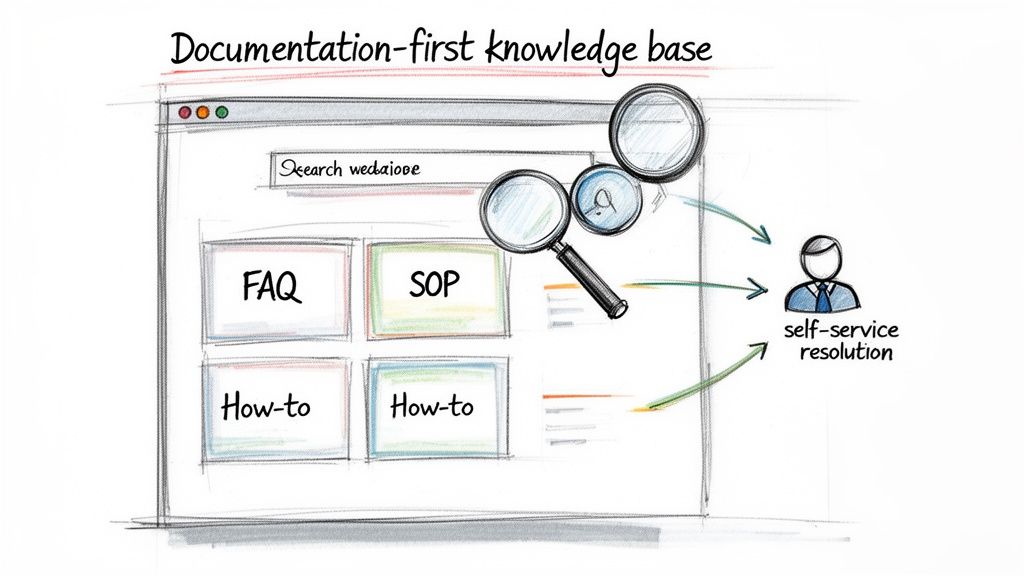
Diagram showing a documentation-first knowledge base, enabling self-service resolution through search, FAQs, SOPs, and how-to guides.

Why It Works & How to Implement It

A robust knowledge base acts as an extension of your team, available 24/7. Tech companies like Stripe and Shopify mastered this by building extensive developer docs and help centers that became the primary support channel. This approach not only scales support but also educates clients, making them more effective partners and reducing friction in the long run.

To implement this effectively:

  • Start with High-Frequency Questions: Analyze your support tickets and emails to identify the top 10-15 most common questions. Build your initial documentation around these to see the quickest impact.
  • Create a Feedback Loop: Establish a process where support inquiries directly inform documentation updates. If a client asks a question not covered in your knowledge base, the answer should be added immediately.
  • Optimize for Discoverability: A great knowledge base is useless if clients can't find what they need. Implement a powerful search function and organize content logically, for instance by user role or project phase.
  • Use Rich Media: Go beyond text. Incorporate screenshots, annotated diagrams, and short video walkthroughs to make complex information easy to digest and follow.

7. Response Time Standards & SLA Management

Client ambiguity around response times is a primary source of frustration and perceived poor service. Establishing clear, written Service Level Agreements (SLAs) defines expected response times for different channels and issue severities, giving your team explicit prioritization rules and your clients predictable support. This practice transforms vague expectations into a transparent, contractual commitment, forming a critical pillar of professional client communication best practices.

By formalizing these standards, you replace client anxiety with confidence. An SLA clarifies precisely when a client can expect a first response and, in some cases, a resolution, preventing the all-too-common "is anyone looking at this?" follow-up. It provides a framework for managing resources and ensures that the most critical issues receive the fastest attention, protecting both client satisfaction and project momentum.

Why It Works & How to Implement It

Formal SLAs are standard practice for enterprise software and service providers like AWS and Zendesk because they build trust through accountability. For an agency, defining a 4-hour response time for "urgent" requests and a 24-hour response time for "low-priority" inquiries sets clear boundaries and demonstrates a structured approach to client service. This prevents misunderstandings and gives your team a defensible standard to operate against.

To implement this effectively:

  • Define Severity Levels Collaboratively: Work with key clients to define what constitutes "urgent," "high," "normal," and "low" priority issues. This ensures your definitions align with their business impact.
  • Integrate SLAs into Contracts: Formalize these response times by including the SLA policy directly in your Master Service Agreement (MSA) or Statement of Work (SOW).
  • Differentiate by Channel and Tier: Set different SLAs for different communication channels (e.g., email vs. emergency phone line) and consider offering tiered SLAs for premium versus standard support packages.
  • Track and Report Transparently: Use your helpdesk or project management software to track SLA adherence automatically. Share performance reports with clients quarterly to demonstrate reliability and build trust.

8. Asynchronous Communication & Documentation Over Meetings

Relying on synchronous meetings for every client update creates calendar chaos, disrupts deep work, and caters poorly to distributed teams. An asynchronous-first approach defaults to written communication that can be consumed on the client's schedule, reserving real-time meetings for high-stakes decisions, brainstorming, and complex problem-solving. This method respects everyone's time and creates a permanent, searchable record of all decisions and context.

By prioritizing documentation and async video, you empower clients to engage thoughtfully instead of reactively. This shift is a key component of modern client communication best practices, allowing for more detailed feedback and reducing the pressure for instant responses. It builds a foundation of clarity and accountability, ensuring all project history is transparent and accessible.

Why It Works & How to Implement It

An asynchronous-first culture fosters deeper, more considered communication and serves as a powerful knowledge base. GitLab, a pioneer in all-remote work, operates on a documentation-first principle, where proposals and decisions are made in shared documents before any meeting is considered. This ensures discussions are well-informed and efficient, preventing meetings from becoming simple status reports.

To implement this effectively:

  • Establish an "Async-First" Rule: Train your team to ask, "Could this meeting be an email, a shared doc, or a quick video?" Make synchronous calls the exception, not the default.
  • Leverage Templated Documents: Create standardized templates in tools like Notion or Google Docs for project briefs, decision logs, and client feedback requests to ensure consistency and clarity.
  • Use Async Video for Complex Topics: Instead of scheduling a call to walk a client through a design, record a brief screencast using a tool like Loom. This allows the client to review, re-watch, and comment at their convenience.
  • Summarize All Synchronous Calls: If a meeting is necessary, always follow up with a concise written summary of key discussion points, decisions made, and action items. This ensures the outcomes are documented and accessible to everyone.

9. Feedback Loops & Regular Communication Audits

Even the most well-designed communication plan can drift off course without regular maintenance. Implementing systematic feedback loops and conducting periodic audits prevents your communication strategies from becoming outdated. This practice ensures your approach evolves based on actual client needs and team performance, rather than on assumptions, making it a critical component of effective client communication best practices.

By actively soliciting client input and analyzing internal communication patterns, you can identify hidden bottlenecks, resolve friction points, and double down on what’s working. This transforms communication from a static process into a dynamic system of continuous improvement, demonstrating to clients that their experience is a top priority.

Why It Works & How to Implement It

A commitment to feedback is a hallmark of high-performing organizations. Slack, for example, built its entire product on user feedback loops, constantly iterating on its features to better serve team communication needs. Similarly, agencies that treat client communication as a product to be improved will see significant gains in satisfaction and retention. This proactive approach stops minor issues from escalating into major relationship problems.

To implement this effectively:

  • Systematize Client Feedback: Don’t wait for clients to complain. Include specific communication questions in post-project debriefs and annual satisfaction surveys. Ask targeted questions like, "On a scale of 1-10, how clear was our project reporting?" or "Which communication channel did you find most effective?"
  • Conduct Internal Audits: On a quarterly basis, review your communication data. Analyze metrics like average response time, first-contact resolution rates, and the frequency of communication across different channels. Look for patterns, such as missed handoffs between teams or channels that have become information silos.
  • Hold Team Retrospectives: Dedicate time in monthly or quarterly team meetings to discuss communication challenges and successes. Create a blame-free environment where team members can flag breakdowns and brainstorm solutions together.
  • Close the Loop: The most critical step is sharing your findings and planned improvements back with the client. When a client sees you’ve adjusted your process based on their feedback, it builds immense trust and reinforces the value of the partnership.

10. Transparent Escalation Procedures & Clear Escalation Triggers

When an urgent issue arises, ambiguity is the enemy of resolution. A transparent escalation procedure provides a clear, documented path for problems, ensuring they move swiftly from initial report to the right expert. This framework prevents issues from getting stuck with junior team members or lost in a communication void, giving clients confidence that their critical concerns will receive the appropriate level of attention without delay.

By establishing predefined triggers and severity levels, you remove guesswork and subjectivity from the support process. This structured approach, a cornerstone of enterprise-level client communication best practices, guarantees that high-priority problems are flagged and addressed with the urgency they require. It transforms a potentially chaotic situation into a predictable, managed response, reinforcing client trust.

Why It Works & How to Implement It

Leading support organizations like AWS and those following ITIL frameworks use tiered severity levels to dictate response times and resource allocation. For instance, a "Critical" issue (e.g., a website outage) might trigger an immediate all-hands response, while a "Low" priority issue (e.g., a minor typo) follows a standard queue. This prevents resource drain on minor problems and ensures major ones get solved fast.

To implement this effectively:

  • Define Severity Levels: Create a clear matrix for issue classification (e.g., Critical, High, Medium, Low) with specific business impact examples for each.
  • Establish Clear Triggers: Set up both time-based triggers (e.g., escalate if a High-priority ticket is un-actioned for 2 hours) and content-based triggers (e.g., any mention of "security breach" or "data loss" is automatically escalated).
  • Build an Escalation Matrix: Document exactly who owns each severity level and who the secondary contact is. This should be a clear chart accessible to the entire team.
  • Make Procedures Visible: Share a simplified version of your escalation policy with clients in your service-level agreement (SLA) or kickoff documents. This manages expectations and shows you have a plan.
  • Train and Drill: Don't just document the plan; actively train your team on it. Junior staff must feel empowered to escalate issues quickly rather than attempting to solve problems beyond their expertise. Run periodic drills to test the process.

Client Communication Best Practices — 10-Point Comparison

Item Implementation Complexity 🔄 Resource Requirements ⚡ Expected Outcomes 📊 Ideal Use Cases 💡 Key Advantages ⭐
Unified Communication Hub & Single Source of Truth High — integrations & migration 🔄 High — platform + integration effort ⚡ Single client view, fewer duplicates, faster resolution 📊 Agencies with many channels and fragmented tools 💡 Consistent context, audit trails, faster onboarding ⭐
AI-Powered Context-Aware First Response High — data cleansing & model tuning 🔄 High — AI infrastructure + training data ⚡ Faster first responses, scaled capacity, consistency 📊 High-volume support; distributed or junior teams 💡 Scales team throughput; reduces senior bottlenecks ⭐
Proactive Communication & Status Transparency Medium — cadence and automation setup 🔄 Medium — templates, dashboarding, small automation ⚡ Lower inbound queries, increased trust and retention 📊 Projects with visible milestones or recurring updates 💡 Reduces firefighting; improves client confidence ⭐
Structured Intake & Discovery Process Medium — template and process design 🔄 Low–Medium — time for interviews/forms ⚡ Clear scope, fewer misunderstandings, better planning 📊 New projects and complex engagements requiring alignment 💡 Prevents scope creep; creates reusable client context ⭐
Stakeholder & Preference Management (Roles, Channels, Escalation) Medium — mapping and ongoing maintenance 🔄 Medium — data capture + routing rules ⚡ Higher engagement, faster approvals, fewer unwanted contacts 📊 Multi-stakeholder enterprise clients and large accounts 💡 Personalizes outreach; improves decision velocity ⭐
Documentation-First Communication & Knowledge Base Medium — authoring and publishing system 🔄 Medium — content creation and maintenance ⚡ Reduced repetitive queries; self-service adoption increases 📊 Products/tools with repeatable questions; large client bases 💡 Scales support; authoritative source for AI and staff ⭐
Response Time Standards & SLA Management Medium — policy + monitoring tooling 🔄 Medium — monitoring, alerts, reporting ⚡ Clear expectations, objective prioritization, capacity insights 📊 Service-based contracts and tiered support models 💡 Professionalism and predictable prioritization ⭐
Asynchronous Communication & Documentation Over Meetings Low–Medium — cultural change & templates 🔄 Low — collaboration tools and training ⚡ Fewer meetings, searchable decisions, deeper focus time 📊 Distributed teams across time zones; deep work environments 💡 Reduces meeting overhead; preserves institutional memory ⭐
Feedback Loops & Regular Communication Audits Medium — survey/process + analysis cadence 🔄 Low–Medium — survey tools and review time ⚡ Identifies gaps, continuous improvement, client-aligned comms 📊 Ongoing client relationships needing refinement 💡 Data-driven improvements; uncovers latent issues ⭐
Transparent Escalation Procedures & Clear Escalation Triggers Medium — define rules and train staff 🔄 Low–Medium — documentation and tooling ⚡ Faster resolution of critical issues; fewer stuck tickets 📊 Time-sensitive support, high-risk projects, enterprise clients 💡 Removes ambiguity; ensures timely senior involvement ⭐

Building Your Agency's Communication Operating System

The journey through these ten client communication best practices reveals a powerful truth: exceptional client service is not a matter of chance, it's a matter of design. We've explored everything from establishing a unified communication hub to implementing AI-powered responses and creating transparent escalation paths. These aren't just isolated tactics to be cherry-picked; they are the essential, interconnected components of a comprehensive communication operating system.

Think of it this way: a chaotic, reactive approach to client interactions is like trying to build a house without a blueprint. You might get a wall up here and a window installed there, but the structure is weak, inefficient, and prone to collapse under pressure. The principles we've covered are your architectural plans, allowing you to build a system that is strong, scalable, and predictable. When you combine a single source of truth with proactive status updates, structured intake processes, and well-documented SLAs, you move from constantly fighting fires to preventing them entirely.

From Disjointed Tactics to a Cohesive Strategy

The true power of this framework emerges when you see how the pieces support one another.

  • A Unified Communication Hub (#1) is the foundation, but it becomes exponentially more powerful when populated with information from a Structured Intake Process (#4) and governed by clear Response Time Standards (#7).
  • Proactive Communication (#3) is made effortless when you have a robust Documentation-First Culture (#6) to pull from, ensuring consistency and accuracy.
  • Transparent Escalation Procedures (#10) are only effective when they are clearly defined within your Stakeholder & Preference Management (#5) system, so everyone knows who to contact and when.

This interconnectedness transforms your agency's operations. You stop relying on the heroic efforts of individual team members and start depending on the reliability of a well-oiled system. This systematic approach empowers everyone, from a junior account coordinator to a senior partner, to deliver a consistently high level of service. It democratizes client management, removing bottlenecks and reducing the risk of knowledge being siloed with one or two key people.

The Ultimate Benefit: Scalable Trust

Ultimately, mastering these client communication best practices is about building scalable trust. Trust is the currency of any successful agency-client relationship. It's built through consistency, reliability, and transparency. When a client knows exactly where to find information, understands your processes, and feels confident that their requests are being handled efficiently, their trust in your agency deepens.

This isn't just about making clients happy in the short term. It's about creating the operational backbone that allows your agency to grow without chaos. As you onboard more clients and expand your team, a robust communication operating system ensures that your quality of service doesn't degrade. In fact, it should only improve as the system becomes more refined. You stop patching holes and fixing broken workflows; instead, you begin operating a business that can run, grow, and thrive without being held together by duct tape and last-minute heroics. The result is higher client retention, increased referrals, and a more profitable, less stressful agency for everyone involved.


Tired of juggling spreadsheets, email threads, and Slack channels to manage client communication? RGK is the purpose-built platform designed to unify all ten of these best practices into a single, intuitive operating system for your agency. See how RGK can help you build a scalable, stress-free client service machine.
Discover how to scale a service business with proven systems

To truly scale a service business, you have to break free from the "hours-for-dollars" trap. It all comes down to three things: systemization to make your processes repeatable, productization to standardize what you sell, and leverage to get more done with the same team. The real secret is shifting your role from doing all the work to architecting the system that does the work. That's what unlocks real, sustainable growth.

Why Most Service Businesses Get Stuck

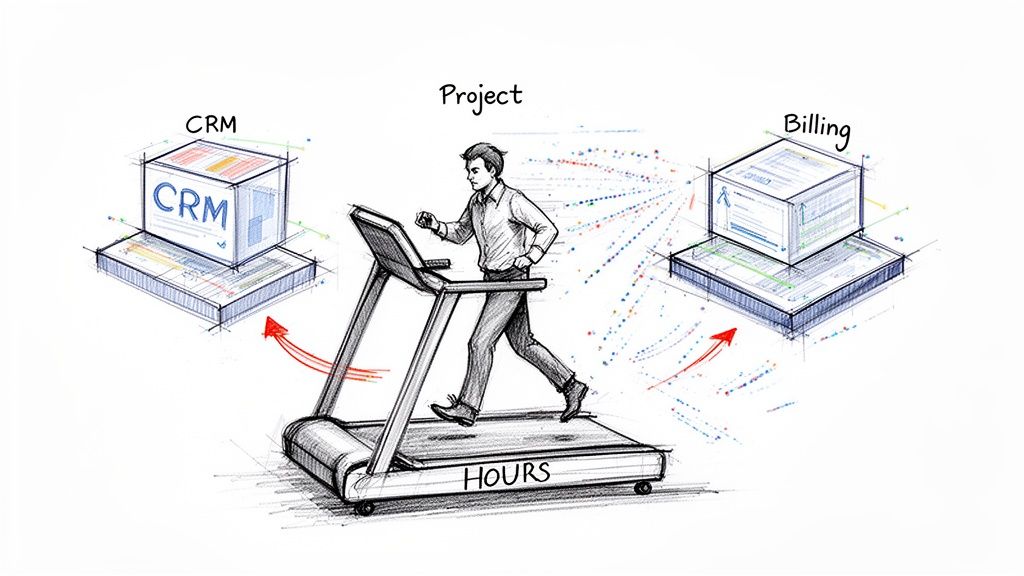
If you're running a service business, this probably sounds familiar. You're stuck on an operational treadmill. Every time you land a new client, you're not just adding revenue—you're adding complexity and more hours to your own plate. You’re caught in a cycle where growth just means working harder, not smarter. This is exactly why so many talented founders hit a revenue ceiling and burn out.

Illustration of a man on a treadmill with 'HOURS' powering 'CRM' and 'Billing' systems for projects.

The roadblock isn't a lack of skill or talent. It's the operational drag created by a jumble of disconnected systems and a total lack of standardized processes.

The Chaos of Disconnected Systems

Most agencies and service providers I've seen are held together by a patchwork of software. The CRM has the client info, a project management tool tracks the actual work, and another system handles the billing. On their own, each tool is fine, but they don’t talk to each other. This creates a mess behind the scenes.

Think about the last time you onboarded a new client. Notes from the sales call had to be manually typed into your project tool. The scope of work lived in a completely separate document. And time tracking? That was probably happening somewhere else entirely. This constant, manual data entry isn't just slow—it's where mistakes happen, communication breaks down, and profits start to leak.

The core challenge of scaling isn't about getting more leads; it's about building a delivery machine that can handle them without breaking. Your focus must shift from just 'doing the work' to architecting a system that delivers consistent value, every single time.

Architecting Your Delivery Machine

To finally get off that treadmill, you need a different way of thinking. Stop looking at your business as a series of one-off client projects. Instead, start seeing it as a single, integrated delivery machine. This mindset is the key to figuring out how to scale a service business for the long haul.

This guide is your roadmap for making that shift. We'll focus on the three pillars that support real growth:

  • Systemization: We're talking about documented, repeatable processes (SOPs) for everything that matters—from how you welcome a new client to how you deliver the final report.
  • Productization: This is where you turn your custom services into standardized packages. Think clear deliverables, set pricing, and no more reinventing the wheel for every new project.
  • Leverage: It's all about using technology and a smart team structure to amplify what each person can do. This allows you to serve more clients without you, the founder, being the bottleneck.

By dialing in these three areas, you can finally build a business that grows with you, not just because of you. Let's dive into the actionable steps to make it happen.

Laying the Groundwork to Scale Your Business

Before you even think about chasing more clients or hiring your next team member, you have to look under the hood. The truth is, most service businesses aren't built to handle rapid growth. Scaling on a shaky foundation is a recipe for disaster—it's like trying to build a skyscraper on sand. It will eventually come crashing down.

The first real step is to get a handle on what you sell and how you deliver it. This means you have to stop the madness of endless custom proposals and one-off projects. It's time to productize your services.

Package Your Services for Simplicity and Speed

Productizing simply means packaging your expertise into a handful of clear, repeatable offers. Each package has a defined scope and a set price. This is, without a doubt, the fastest way to simplify your sales process and bring consistency to your operations.

Let’s take a web design agency as an example. Instead of drafting a new proposal for every lead that comes in, they could offer three distinct packages:

  • Launch Package: A five-page starter website using a proven template—perfect for a business just getting off the ground.
  • Grow Package: A more robust ten-page site that includes foundational SEO and a content strategy session.
  • Scale Package: A full-blown e-commerce build with all the bells and whistles for established brands ready to grow their online sales.

See how much clearer that is? This tiered model does the heavy lifting for you. Prospects can practically qualify themselves based on their budget and needs, which cuts your sales cycle down dramatically. You’re no longer reinventing the wheel on every sales call; you’re guiding people to the best solution you’ve already built.

When you shift from custom work to productized packages, you transform your business from a bespoke art project into a well-oiled machine. It’s the key to creating repeatable systems, training people effectively, and actually being able to forecast your revenue.

This isn't just a theoretical change. We've seen businesses boost their efficiency by 20-30% just by cutting out the wasted time on custom scoping and proposal writing. If you're serious about scaling, this is non-negotiable.

Get Brutally Honest with an Operational Audit

Okay, so you know what you’re selling. Now you need to take a hard, honest look at how you’re delivering it. An operational audit isn't about pointing fingers. It's about uncovering the hidden friction—the little things that slow you down, frustrate your team, and eat away at your profit margins.

The goal here is to map out your entire client journey, from the first "hello" to the final invoice.

Grab your team, a whiteboard (or a Miro board), and trace every single step. At each stage, you need to ask some tough questions:

  • Onboarding: How does a new client’s information get from sales to the delivery team? Is someone manually copy-pasting data between systems?
  • Kickoff: What are the exact steps to get a project started? Who owns each task? Is anything ambiguous?
  • Execution: Where do handoffs happen? Are they seamless, or is that where projects go to die?
  • Reporting & Delivery: How do we create client reports? Is it a standardized process, or does every project manager have their own "special" way of doing it?
  • Offboarding: What’s the final checklist before we call a project "done"? How long does it take us to send that final invoice?

When you map it all out visually, the bottlenecks become glaringly obvious. Maybe you realize projects are always delayed because your initial asset request email is vague. Or perhaps the delivery team is constantly missing key details because the handoff from sales is just a verbal conversation. These tiny friction points multiply into huge problems as you add more clients.

I once worked with a marketing agency that discovered they were wasting an average of three hours per client just on email back-and-forth to get social media access. By creating a single, secure form for credentials during onboarding, they instantly reclaimed that time. That’s three hours back per client to spend on work that actually matters.

Fixing these small inefficiencies now is critical. If you don't, you'll just be scaling broken processes, which only leads to bigger, more expensive chaos down the line. This audit will give you your hit list—a clear, actionable set of problems to solve first.

Designing Your System for Repeatable Delivery

If you want to scale, consistent, high-quality delivery is non-negotiable. Without it, growth just means more chaos, more mistakes, and more fires to put out. Building a system for repeatable delivery is how you essentially clone your best work, empowering your team to execute flawlessly—even when you’re not in the room. This is where you build your operational engine.

This engine runs on two core components: documented processes and a central hub for all project and client information. This isn't about creating rigid, bureaucratic rules. It's about establishing clear, simple guardrails that reduce mental load and eliminate guesswork. The goal is to make the "right way" of doing things the easiest way.

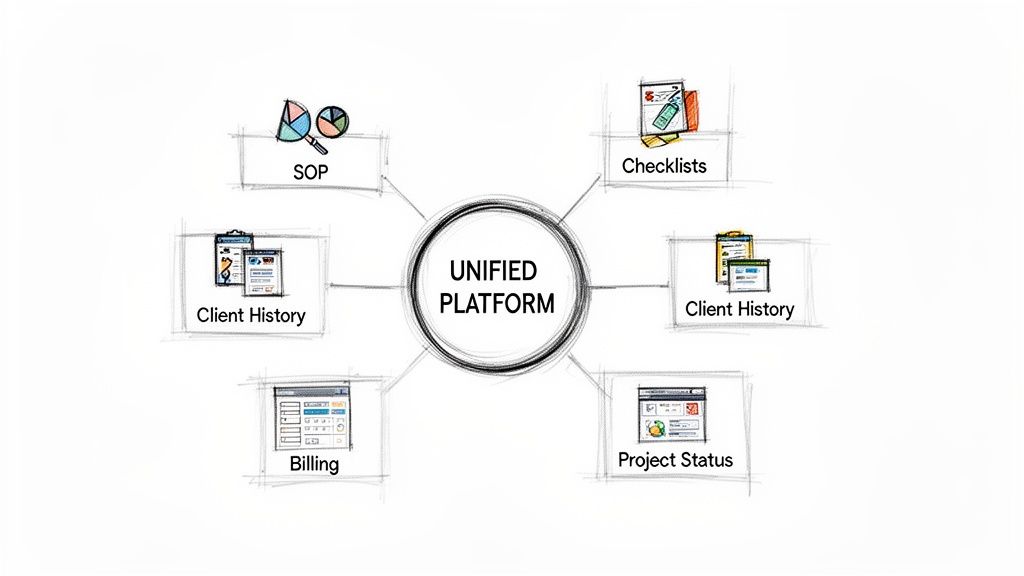
A diagram illustrates a unified platform integrating standard operating procedures, checklists, client history, billing, and project status.

This systematic approach is more critical than ever. Service-based businesses make up over 70% of U.S. small business GDP and employ millions. We're all under immense pressure to scale intelligently as client demands for faster delivery and seamless experiences skyrocket. A well-designed system is your secret weapon. For more on this, check out these insights on the latest service business trends.

Create Actionable Standard Operating Procedures

Forget the dusty, three-ring binder of procedures that no one ever reads. Modern Standard Operating Procedures (SOPs) need to be dynamic, living documents built directly into your team's daily workflow. Think of them as the tactical instruction manuals for every critical task your business performs.

You have to start somewhere, so begin by documenting your highest-impact processes. Don't try to boil the ocean. Just focus on the tasks that are either repeated constantly or carry the highest risk if done wrong.

Good candidates for your first few SOPs include things like:

  • Client Onboarding Checklist: Every single step, from collecting brand assets to scheduling the kickoff call. Leave nothing to chance.
  • Project Kickoff Process: The exact agenda and task sequence to get a new project off to a perfect start.
  • Monthly Reporting Guide: A step-by-step on how to pull metrics, format the report, and add client-specific insights that show value.
  • Quality Assurance Protocol: A final review checklist to ensure every deliverable is buttoned up and meets your quality standards before it hits the client's inbox.

For each SOP, I recommend a mix of simple checklists, short video tutorials (using tools like Loom), and clear, concise text. The key is to make them easy to follow in the heat of the moment.

Build Your Single Source of Truth

One of the biggest drags on a growing service business is scattered information. You know the drill: client history lives in the CRM, project tasks are in one tool, key conversations are buried in Slack, and billing is in another system entirely. This kind of fragmentation is a recipe for expensive errors and wasted time.

A single source of truth (SSoT) fixes this. It's a unified platform or a tightly integrated set of tools where all critical business information resides. When a team member needs to know a client's history, the status of a project, or the details of a support ticket, they know exactly where to look. No more hunting.

This concept is a game-changer. Instead of frantically searching through email chains or pinging colleagues for context, your team can operate with confidence and autonomy. Imagine a junior project manager being able to instantly access a client's entire project history, past invoices, and all support communications without having to interrupt a senior team member. That's the power of an SSoT.

A single source of truth isn't just a productivity hack; it's a foundational element for delegation. It gives you the peace of mind to hand off high-stakes work because you know your team is operating with the complete, correct information.

Choosing the Right Tools for Your System

The tools you choose will either support or undermine your entire system. It's tempting to chase the latest shiny object, but the best tech stack is the one your team will actually use consistently. My advice is to focus on platforms that prioritize integration and centralization.

Here’s a practical way to think about building your tech stack:

  1. Start with a Core Hub: Select a primary platform to act as your SSoT. This is often a robust project management tool or a specialized agency operating system like RGK.
  2. Integrate Crucial Spokes: Connect essential tools for communication (like your team chat app) and finance (like your accounting software) directly into that central hub.
  3. Document Tool Usage in Your SOPs: Your SOPs must specify which tool to use for which task. For example, an SOP might state, "All client-facing communication must be logged as a comment on the relevant project task in [Your PM Tool]."

This deliberate approach to tooling prevents the "wild west" of using random apps for critical functions. It reinforces your system, breaks down information silos, and ensures your single source of truth stays reliable as you grow. This operational clarity is what separates businesses that scale smoothly from those that crumble under their own success.

Hiring and Structuring Your Team for Scale

As you grow, the temptation is to just throw more people at the work. Don't do it. Simply adding to the payroll is the quickest way to kill your profit margins and create a management headache you’ll never escape.

Scaling your team is really about intelligent design. The goal is to hire for specific functions inside the systems you’ve already built, not just to fill a seat. Your SOPs become the blueprint, telling you exactly what roles you need. Instead of a generic "Project Manager," you can now hire a "Client Onboarding Specialist" whose job is mapped directly to your onboarding checklist.

This little shift makes your hiring process faster, more precise, and a whole lot more effective.

Building a Blended, Cost-Effective Team

You don't need a roster of expensive, senior-level experts to scale. In fact, that's one of the most common mistakes I see founders make. A much savvier approach is building a blended team that balances cost with skill, giving you the horsepower you need without the massive overhead.

Here’s what that looks like in practice:

  • Junior Staff: Think of them as your executors. Their job is to follow your meticulously crafted SOPs and handle the day-to-day delivery. They're cost-effective and, when plugged into a great system, incredibly productive.
  • Specialized Contractors: Need a top-tier copywriter for a specific campaign or a data analyst for a one-off project? Bring in a specialist on a contract basis. You get access to A-level talent without the long-term commitment of a full-time salary.
  • Senior Mentors: The role of your experienced people needs to change. They should graduate from being "doers" to being mentors and strategists. Their job is to QA the work, solve the truly tough problems, and guide the junior team—not get bogged down in every single task.

This model keeps your fixed costs low and gives you the flexibility to handle a huge variety of client work. Your senior talent becomes a force multiplier, spreading their expertise across the entire portfolio instead of being trapped on one or two accounts.

To illustrate the difference this makes, let's compare the old way of scaling an agency with this more modern, system-led approach.

Scaling Models Comparison: Traditional vs System-Led

Attribute Traditional Scaling System-Led Scaling
Hiring Focus Adding senior-level "doers" to handle more work. Hiring junior staff to execute proven systems.
Cost Structure High fixed costs; payroll balloons with each new client. Low fixed costs; flexible use of contractors keeps overhead down.
Owner's Role Deeply involved in daily operations; becomes a bottleneck. Focused on strategy and growth; removed from the day-to-day.
Efficiency Relies on individual heroics; inconsistent and hard to predict. Driven by systems and SOPs; highly consistent and predictable.
Profitability Margins shrink as headcount and management complexity grow. Margins increase as systems create more leverage.

As you can see, the system-led model is built for sustainable growth, freeing you up to work on the business, not just in it.

Using AI as Your Ultimate Force Multiplier

This is where things get really powerful. Modern AI tools, like the ones we’ve built into our platform at RGK, can act as an incredible force multiplier for your team. When an AI has context on all your client history, SOPs, and project data, it gives your junior team members the institutional knowledge they would otherwise take years to develop.

Imagine a new support agent getting an instant, accurate answer by asking the system, "What was the fix for Client X's last billing issue?" They can suddenly perform at a level far beyond their experience.

By baking AI directly into your operations, you're giving your team the guardrails and context to make smart, independent decisions. This turns your senior people into strategic overseers, not firefighters, and lets you scale delivery without a linear increase in senior headcount.

Keeping Communication Clear with an Org Chart

As you grow beyond a handful of people, informal "tap on the shoulder" communication falls apart. You end up with a tangled mess of DMs and email threads. This is where a simple organizational chart becomes essential.

This isn't about stuffy corporate bureaucracy; it's a practical tool for clarity. It answers crucial questions like, "Who do I talk to about a billing problem?" or "Who has the final sign-off on creative?" A simple chart prevents crossed wires and makes sure everyone understands how information and decisions are supposed to flow.

This becomes especially critical as you add more services. In fact, a recent study found that 97% of MSPs plan to expand their offerings, adding an average of six new services. You can read more about these industry growth statistics to see the trend. Without a clear team structure, that kind of expansion is a recipe for chaos.

When you combine precise roles, a blended team, AI-powered support, and a clear org chart, you create a framework for hiring that truly supports profitable, sustainable growth.

Winning and Keeping the Right Clients

You've done the hard work of building a scalable delivery engine. Now, it's time to turn on the faucet. But scaling isn't just about chasing every possible lead; it's about attracting the right clients and making sure they stick around for the long haul. Your new productized services are the key, giving your sales team a clear, consistent playbook for closing deals.

The real magic, though, isn't in the initial sale. It's in retention and expansion. We've all heard it a thousand times: it costs way more to land a new customer than to keep an existing one. Great, systemized service is your best retention tool, turning what could have been a one-off project into a predictable, long-term revenue stream.

Building a Sales Machine That Runs Itself

Your standardized packages are the fuel for this machine. You can finally stop reinventing the wheel with every custom proposal. The conversation completely changes from a vague, "So, what can we build for you?" to a confident, "Which of our proven solutions is the best fit for your goals?"

This shift makes your sales process something you can actually teach and scale. You can bring on a junior salesperson, train them on the value of each package, and arm them with case studies and clear deliverables. They don't have to be a senior strategist to sell, because the strategy is already baked right into your offers.

Getting this operational alignment right is a massive challenge for most agency owners. While a recent report found that 78% of small business owners plan to grow and 69% are optimistic about their finances, they're often held back by disconnected tech and clunky manual processes. It’s a classic case of growth being limited by a lack of smart systems. If you want to dive deeper into these challenges, you can check out the full small business growth report.

Look Beyond Acquisition: Retention is King

Winning a new logo feels fantastic, but the agencies that truly print money are masters of retention. The metric you need to become obsessed with is Net Revenue Retention (NRR). This number tells you how much your revenue from existing customers grew or shrank over a period, factoring in both upsells and churn.

An NRR over 100% is the holy grail. It means your existing clients are spending more with you over time, even after you lose a few. You're literally growing your business without signing a single new client. That's the sign of an incredibly healthy, scalable service.

Getting to a high NRR doesn't happen by accident. You can't just do good work and cross your fingers, hoping clients will stay. You need to build systems that actively create opportunities for them to buy more from you.

Systematize Your Upsells and Cross-Sells

This is where your integrated platform becomes your secret weapon. With all your client communication, project data, and support tickets living in one place, you can set up automated triggers that practically hand-deliver expansion opportunities to your team.

Here’s what this looks like in the real world:

  • Post-Project Plays: Imagine a client's "Website Launch" project is marked complete. The system can automatically create a task for their account manager to schedule a 60-day check-in. The goal of that meeting? To introduce the "SEO Foundation" package and show them how to get traffic to their shiny new site.
  • Service Usage Alerts: Let's say a client on your "Basic" support plan blows past their ticket limit for the month. Instead of just dealing with the overload, the system flags it for the account manager. This is the perfect, data-backed reason to have a conversation about upgrading to the "Pro" plan.
  • Smart Cross-Sell Nudges: When a new client signs on for your content marketing service, your system could automatically tag them as an ideal fit for your paid ads management package. The account manager gets a heads-up to bring it up in their next quarterly business review.

This isn't about being a pushy salesperson. It's about using the data you're already collecting to anticipate what your clients need next and genuinely help them. When you embed these kinds of triggers into your day-to-day operations, you turn expansion from a hopeful "maybe" into a predictable, proactive process. This is how you build true partnerships, lock in recurring revenue, and prove that exceptional service is the most powerful growth strategy you have.

Your 90–180 Day Roadmap to a Scalable Business

Alright, let's turn all this theory into reality. The biggest hurdle I see when people try to scale is getting lost in the "how." It's easy to feel overwhelmed and try to fix everything at once. That's a recipe for burnout.

Instead, we're going to break this down into a manageable 90-day plan. Think of it as three focused sprints, each building on the last. This creates momentum and gives you tangible wins along the way, turning a mountain into a series of small, climbable hills.

Month 1: The Audit and Productize Sprint

The first 30 days are all about discovery and focus. Before you start building anything new, you need a crystal-clear picture of what’s actually happening in your business right now. We're looking for the good, the bad, and the ugly.

Your mission this month is twofold:

  • Run a Full Operational Audit: Get a whiteboard (physical or digital) and map out your entire client lifecycle. I mean everything—from the first "hello" to the final payment and offboarding. Where are the bottlenecks? What tasks are you doing over and over again manually? Pinpoint every single friction point that's costing you time or creating headaches.
  • Productize Your Core Service: Armed with insights from your audit and real client feedback, it's time to simplify. Define one to three core service packages. No more custom-quoting every single project. Standardize the scope, nail down the deliverables, set a clear timeline, and establish fixed pricing. This is the single most important step toward creating a service that can be delivered repeatably.

Month 2: The Document and Build Sprint

Now that you have a streamlined, productized offer, it's time to build the operational machine that will deliver it. This month is all about getting the processes out of your head and into a system your team can follow.

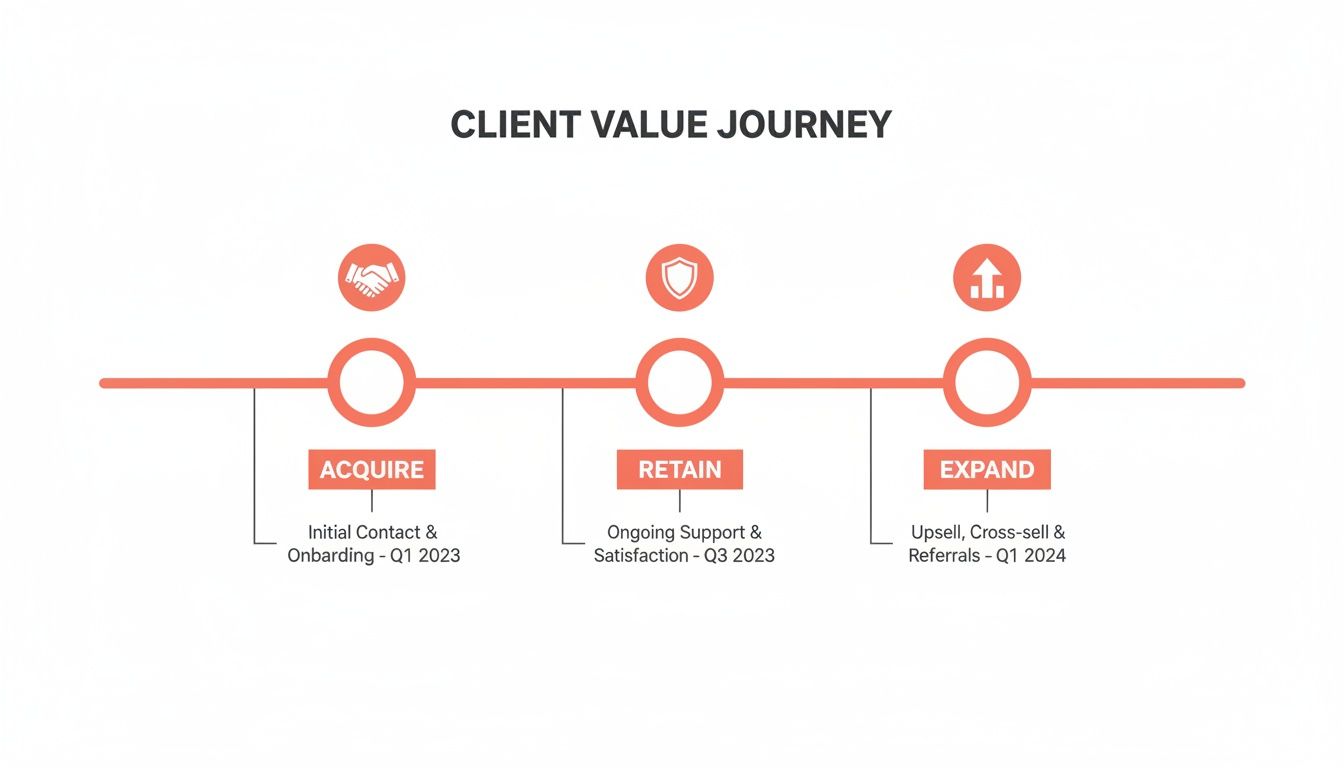
This is where you build the foundation for a consistent client experience—one that not only helps you land new business but keeps clients happy and grows their accounts over time.

A client value journey timeline showing acquire, retain, and expand stages with descriptions and dates.

The goal here isn't just efficiency; it's about creating a predictable, high-quality experience that turns one-off projects into long-term partnerships.

By the end of this month, you should have the first version of your company "playbook." This isn't just a document; it's the key to empowering your team and freeing yourself from the day-to-day grind.

Month 3: The Train and Refine Sprint

Your final 30-day sprint is all about putting your new systems into action. A perfectly documented process is useless if nobody on the team knows how to use it—or worse, if it doesn't actually work in the real world. This is where the rubber meets the road.

Here's how you'll close out the 90 days:

  • Train the Team: Don't just send a memo. Hold dedicated training sessions. Walk everyone through the new standard operating procedures (SOPs) and tools. Let them ask questions, push back, and really understand the "why" behind the changes.
  • Run a Pilot Project: Pick one new or trusted client and run their project through your new system from start to finish. This is a live-fire exercise to see how everything holds up under pressure.
  • Gather Feedback and Iterate: After the pilot, bring everyone together. What worked? What felt clunky? Get honest feedback from your team and even the client. Use these insights to make a final round of tweaks and polish your process.

Common Questions About Scaling a Service Business

Moving from a do-it-all founder to the leader of a scalable business is a huge shift, and it naturally comes with a lot of questions. Let's tackle some of the most common hurdles I see service business owners face when they start this journey.

When Is the Right Time to Start Building Systems?

Honestly, the best time to start was yesterday. The second-best time is right now.

A clear sign you've waited too long is when you, the owner, have become the bottleneck for every decision, every approval, every single thing. If the business can't function for a week without you checking your phone on vacation, it's past time to systemize.

Start documenting your core processes when you have a handful of clients—maybe five or so. Don't wait until you're drowning with 50 clients and the whole operation feels like it's on fire. Being proactive here prevents you from making rushed, sloppy decisions under pressure.

How Do You "Productize" a Creative Service Without Killing the Magic?

This is a big one for designers, writers, and strategists. Productizing a creative service isn't about churning out cookie-cutter work; it's about standardizing the process that leads to great outcomes.

Think about it in terms of a repeatable workflow. You can map out distinct phases that every project moves through:

  • Discovery & Kickoff
  • Strategy & Concepting
  • Execution & Revisions
  • Final Delivery & Handoff

From there, you bundle these phases into clear packages with defined deliverables, timelines, and a fixed price. For example, a "Brand Identity Package" gives the client a predictable result and gives your team a predictable workload. It takes the "how much will this cost?" guesswork completely off the table.

Solid SOPs aren't about micromanaging. They automate the 80% of routine work—like how to name files, onboard a new client, or format a report. This frees up your team's brainpower to focus on the 20% of the work that actually requires their creative genius.

Won't Standard Operating Procedures (SOPs) Stifle My Team's Creativity?

It’s a fair question, but in my experience, it’s the exact opposite. Good SOPs don't restrict creativity; they enable it. They provide the guardrails and a solid foundation, giving your team the confidence and autonomy to do their best work.

When your team isn't bogged down trying to remember a dozen administrative details or reinventing the wheel on every project, they have more mental energy to spare. That energy gets channeled directly into solving tough client problems and delivering amazing results—the very stuff you hired them for.


When client history, project details, and billing information are scattered everywhere, your team spends more time hunting for info than doing great work. RGK brings it all together into a unified platform, eliminating the frantic search and empowering your team to operate with confidence. Discover how RGK can become your single source of truth.

How to Delegate Tasks Effectively and Scale Your Agency

Delegation isn't just about handing off a task you don't want to do. It's the art of strategically assigning the right work to the right people, with crystal-clear instructions and a shared understanding of what "done" looks like. It's a leadership muscle that requires trust—trust in your team to execute and trust in yourself to focus on the high-level work that actually grows the business.

When done right, delegation isn't offloading; it's a direct investment in your team's skills and your agency's future.

Why Mastering Delegation Is Your Agency's Ultimate Growth Hack

In the whirlwind of agency life, it's easy to wear "busy" as a badge of honor. You're the final eyes on every proposal, the first call for a client crisis, and the only one who really knows how to pull that one obscure report. This feels like quality control, but in reality, it's the single biggest bottleneck stunting your agency's growth. When you cling to tasks, you create a system that can't function without you at the center.

This hands-on-everything approach has real, damaging consequences. Projects grind to a halt waiting for your sign-off, your best senior talent gets stuck on low-level work, and team morale slowly erodes when capable people feel micromanaged and untrusted. That ripple effect inevitably reaches your clients, who start noticing slower response times and project delays.

Shifting Your Mindset from Cost to Investment

The biggest mental block to delegation? The classic "it's just faster if I do it myself" trap. And sure, for a one-off task, you might be right. But that thinking is dangerously short-sighted. Every time you do something a team member could have done, you're not just spending your time—you're stealing a growth opportunity from them and preventing your agency from building a scalable process.

The question isn't "Can I afford to delegate this?" It's "How can my agency afford not to?"

By not delegating, you are automatically choosing to do the lower-value work. You are choosing to be a bottleneck. You are choosing to stunt your team's growth.

This mindset shift is critical. The data paints a clear picture of what's at stake. An analysis of Inc. 500 CEOs revealed that leaders with strong delegation skills saw an average three-year growth rate of 1,751%—dwarfing their peers. Other reports show that managers who delegate effectively can generate 33% more revenue than those who struggle to let go. You can find more of the hard numbers on the financial impact of delegation from StaffConnect.

Before we dive deeper, let's look at the two very different realities for agencies, depending on how they handle delegation. The contrast is stark.

Delegation's Impact on Agency Performance

Metric Ineffective Delegation (The Bottleneck) Effective Delegation (The Growth Engine)
Leadership Focus Buried in daily tasks and firefighting Strategic planning, client relationships, business development
Team Morale Low; employees feel untrusted, micromanaged, and bored High; team feels empowered, trusted, and has clear growth paths
Project Velocity Slow; projects stall waiting for a single person's approval Fast; multiple workstreams run in parallel with clear ownership
Scalability Limited; growth is capped by the leader's personal capacity High; systems and people are in place to handle more clients
Client Satisfaction Inconsistent; prone to delays and communication gaps Consistently high; responsive, efficient, and proactive service
Profitability Stagnant; high-cost leaders are doing low-value work Growing; operational efficiency drives higher margins

The table makes it obvious: one path leads to burnout and stagnation, while the other leads to a thriving, scalable business.

Ultimately, learning to delegate is about building an agency that runs on strong systems, not just your personal heroics. It’s about empowering your team, cranking up your operational efficiency, and finally freeing yourself up to do the one thing only you can do: lead.

Deciding What to Delegate with the 4D Framework

Before you can get good at how to delegate, you’ve got to figure out what to delegate. Just throwing tasks at people without a plan is a classic mistake. It feels productive, but you end up creating more confusion than clarity. You need a system to audit what’s on your plate and be strategic about what you hand off.

The 4D Framework is a dead-simple but surprisingly effective way to sort through your to-do list. It forces you to put every single task into one of four buckets: Do, Delegate, Defer, or Delete. This isn't just about freeing up your calendar; it's about making sure your time—your most valuable asset—is spent on what actually moves the needle.

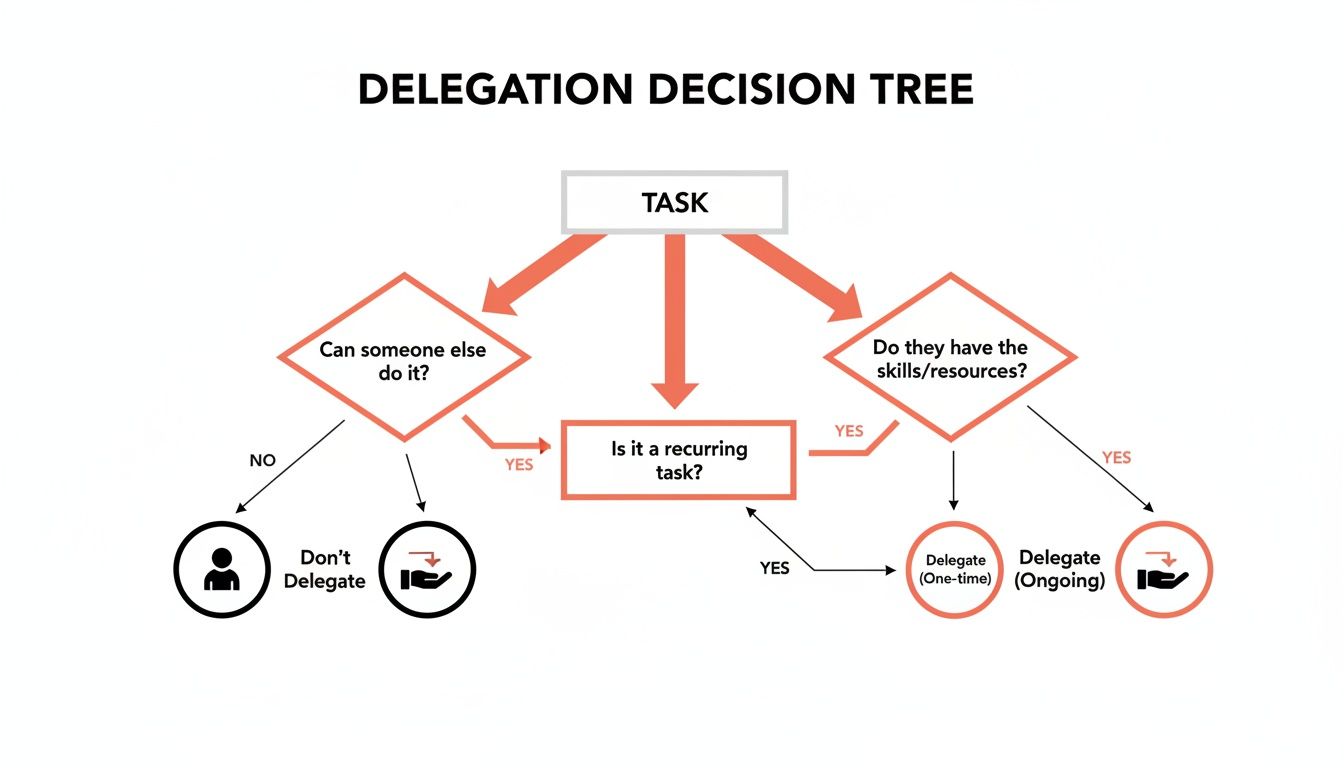
This decision tree helps visualize the process. It's a quick gut-check for whether something is a candidate for delegation or needs to stay with you.

A flowchart illustrating a delegation decision tree with questions on task type and team capabilities.

As you can see, the real question is whether a task requires your specific, unique expertise or if it's something that can be systemized and handed over to a capable team member.

Do It Yourself

These are the big ones—the tasks that absolutely require your unique skills, authority, or vision. They're often high-stakes, tied directly to the agency's future, or involve critical client relationships. Delegating these too early will backfire, big time.

Think about things like:

  • Finalizing a massive proposal for a dream client.
  • Navigating a tricky negotiation with a major partner.
  • Setting the strategic roadmap for the next quarter.

The trick is being honest with yourself about what truly needs you. A lot of leaders hang onto tasks because they enjoy them or are just used to doing them, not because they are the only person who can.

Delegate It to Someone Else

This is where you create leverage. These tasks are important, but they don't depend on you personally doing them. They are often repeatable, follow a clear process, or fall right into a team member's zone of genius (or could, with a little training).

Delegation isn’t about offloading work you hate. It’s about empowering your team with responsibility that helps them grow, which in turn frees you up for the work only you can do.

If you can write down the steps to get it done, it’s almost always a prime candidate for delegation.

Some classic agency examples include:

  • Weekly Reporting: Pulling analytics and putting them into the standard client report template.
  • New Client Onboarding: Setting up projects in your PM tool, sending welcome kits, and scheduling the kickoff call.
  • Social Media Scheduling: Loading approved content into the scheduler according to the content calendar.

Handing these off doesn’t just clear your to-do list; it builds skills and confidence across your team.

Defer It for Later

This bucket is for things that are important, but not right now. These are the "someday/maybe" items that can easily distract you from what's urgent. Deferring isn't just procrastinating—it's making a conscious choice to tackle something when the timing is better.

For instance, you might defer a project to overhaul the internal knowledge base until after you’ve wrapped up a massive client launch. Just make sure you actually schedule a time to revisit these deferred tasks so they don't fall into a black hole.

Delete It Entirely

This one is my favorite because it’s so liberating. We all do things out of habit that provide little to no value. The "Delete" bucket is for any task that, if it vanished, would have zero negative consequences. Think outdated reports nobody reads, pointless recurring meetings, or redundant internal processes.

Ask yourself one simple question for every task: "What would actually happen if I just stopped doing this?" If the honest answer is "nothing," you’ve found something you can strike from the list for good. Getting comfortable with this is one of the fastest ways to simplify your entire operation.

Matching the Right Task to the Right Person

Okay, so you've figured out what to delegate. Now comes the trickier part: who gets the task? Just tossing work at the first person with a free moment is a classic rookie mistake, and it almost always leads to frustration, shoddy work, and endless revisions.

Handing a complex task to the wrong person can actually create more work than if you'd just done it yourself. You'll end up with missed deadlines, a drop in quality, and a team member who feels completely out of their depth.

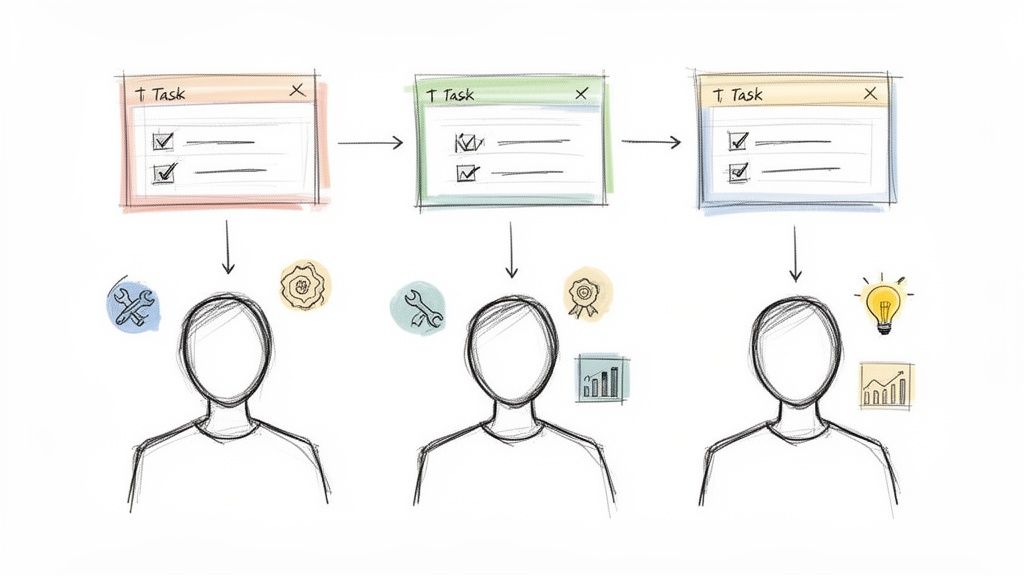
Three individuals receive a task, demonstrating task delegation and varied skills for different outcomes.

Think of it like casting for a role. You're not just filling a spot; you're looking for the perfect fit between the opportunity and the person. You need to find that sweet spot where their skills, current capacity, and personal growth goals all line up.

Look Beyond Your Go-To People

It’s so easy to fall into the trap of giving all the important stuff to your senior folks. They're your A-team—reliable, experienced, and you trust them to nail it every time. But this habit is a silent killer of team growth. It burns out your top performers and keeps your junior talent from ever getting the reps they need to level up.

Before you automatically assign that next big task, pause and scan your whole team. Who’s been asking to learn a new skill? Who has a hidden talent for something outside their job description? That quiet account coordinator might be a spreadsheet wizard, or a junior designer might have a surprising flair for client presentations.

Effective task delegation is not just about workload management; it's one of the most powerful professional development tools you have. Every delegated task is a chance to build someone’s skills and confidence.

Don't shy away from stretching people a bit. Giving someone a task that’s just a little beyond their current comfort zone (with your support, of course) is how you build a truly formidable team. It creates resilience and cross-functional skills, so you're not left scrambling when your key players are out of office.

The Skills, Workload, and Motivation Checklist

Making the right match comes down to quickly running through three critical factors. It’s a mental checklist that will save you a world of hurt later on.

  • Skills & Competence: Do they have the core skills to get this done? If not, do they have the aptitude to pick it up quickly with a bit of guidance? Think beyond just technical abilities—consider soft skills like problem-solving, attention to detail, and communication.

  • Current Workload & Capacity: Is their plate already overflowing? Dropping a new priority on someone who's already drowning is just setting them up to fail. Always do a quick gut check on their current bandwidth to make sure they can give the task the focus it needs.

  • Interest & Growth Potential: Is this something they want to do? Will it help them get where they want to go in their career? People produce their best work when they're genuinely engaged. Framing a task as a growth opportunity can be a massive motivator.

When you weigh these three things, delegation stops being a transaction and becomes a strategic tool for building a stronger, more capable team.

It's About Empowerment, Not Dumping

Once you've picked your person, the job isn't over. The handoff is crucial. Just dropping a task in their lap without context or authority isn't delegation; it's just dumping. True empowerment means setting them up for a win right from the start.

This boils down to providing three key things:

  1. The "Why": They need to understand how this task fits into the bigger picture. When they know why it matters to the project or the client, they can make smarter decisions on their own.

  2. The Authority: Give them the power to make the decisions needed to get the job done. If they need to coordinate with another team or spend a little money, make it clear they have your blessing. This prevents them from becoming a bottleneck.

  3. The Resources: Make sure they have access to the right tools, documents, and institutional knowledge. A link to a solid Standard Operating Procedure (SOP) or a well-organized project folder can make all the difference.

This approach pays off in a big way. Workplace research has shown that when people are given more ownership through delegation, they report higher job satisfaction and feel more engaged. A study on workplace delegation and its benefits found a direct link between effective delegation and employees feeling a stronger sense of influence over their work.

When you give your team everything they need to succeed, you're building a culture where people don't just complete tasks—they own outcomes.

Crafting Bulletproof Briefs and Repeatable SOPs

You've picked the right task and found the perfect person for it. Great. But don't pop the champagne just yet. This next step is where delegation lives or dies—not in the handoff, but in the instructions you provide.

Handing someone a vague brief is like asking them to build a piece of IKEA furniture without the manual. They might get there eventually, but it’s going to be a painful, wobbly mess.

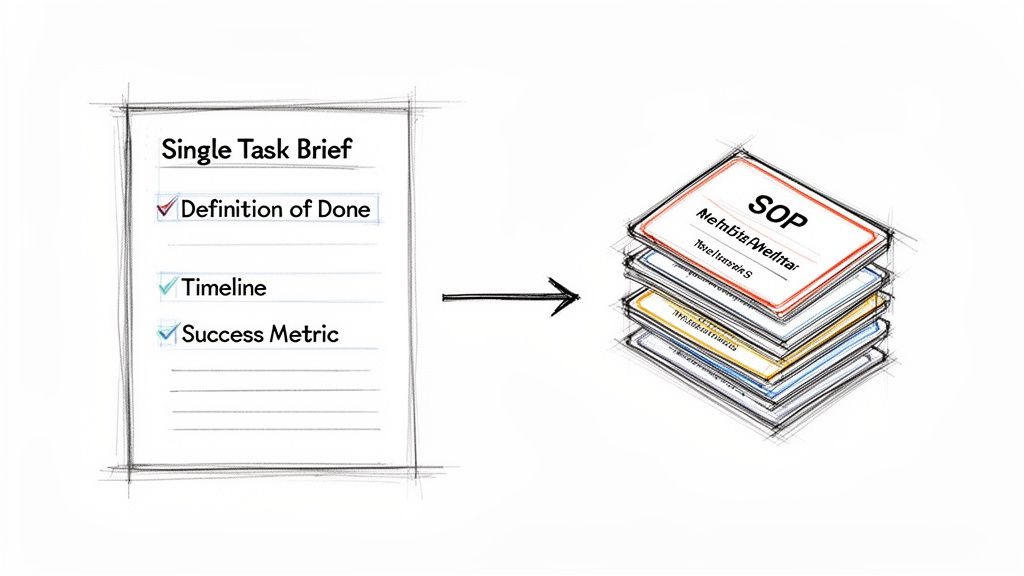
A single task brief outlining definition of done, timeline, and success metrics, leading to a stack of SOP documents.

Ambiguity is the silent killer of effective delegation. To snuff it out, you need two core assets in your arsenal: the task brief for one-off projects and the Standard Operating Procedure (SOP) for everything else.

The Anatomy of a Perfect Task Brief

A solid task brief is more than just a to-do list; it’s a complete instruction manual for a specific outcome. The goal is to answer every question before it’s even asked, eliminating the endless back-and-forth that drains everyone’s time.

Here's what every bulletproof brief needs:

  • The "Why" Behind the Work: Kick things off with a sentence or two connecting this task to the bigger picture. When your team knows why they're doing something, they can make smarter decisions without you.
  • The "Definition of Done": This is non-negotiable. Be ruthlessly specific. Don't just say, "pull a social media report." Instead, try: "Create a PDF report for Client X using our standard template, covering reach, engagement rate, and the top three posts from the last 30 days."
  • Success Metrics: How will you both know this was a home run? Define what success looks like. It could be as simple as, "The report is sent to the client by Friday at 5 PM with zero data errors."
  • Timeline and Checkpoints: Give a firm final deadline. For bigger tasks, schedule a few key milestones or check-in points to make sure things are on track without having to hover.
  • Budget and Resources: If there’s an ad spend, a budget for stock photos, or any other cost involved, spell it out. And for heaven's sake, link to everything they'll need—the template file, the analytics login, the project folder.

This isn't about micromanaging; it's about providing clarity.

A great task brief doesn't just give instructions; it transfers context. It’s the difference between saying "go get groceries" and handing someone a detailed list, a store map, and the credit card.

Turning One-Off Wins into Repeatable Systems

The moment a team member nails a task using one of your excellent briefs, you’ve struck gold. You now have the raw materials to turn that single successful execution into a repeatable process anyone can follow. This is how you stop reinventing the wheel and actually start scaling your agency.

An SOP is just a documented, step-by-step guide for a recurring task. Building one is simple.

  1. Document the Process: Right after the task is completed, sit down with the person who did it and have them walk you through the exact steps they took.
  2. Make it Visual: Words are good, but screenshots and short video recordings are better. Use a tool like Loom to record quick screen-shares. Visuals cut through confusion instantly.
  3. Centralize Everything: Don't let your SOPs die in a random Google Doc. Create a central knowledge base in a tool like Notion, Slab, or a well-organized Google Drive folder that everyone can access and search.

Building this library is an investment that pays you back, over and over again. The next time you need that weekly social media report, you don't write a new brief from scratch. You just assign the task and link to the SOP.

Despite how much sense this makes, a shocking number of agencies are still stuck in the dark ages. Recent surveys show that 81% of North American firms and 78% of UK firms are still delegating tasks manually. This old-school approach creates massive administrative drag and almost guarantees you’re not putting your best people on the right work. You can dig into more of these findings on profitable task delegation.

By systemizing your work with briefs and SOPs, you’re not just being more efficient. You’re building a resilient operation where anyone—from a brand-new hire to a seasoned pro—can execute key tasks to the same high standard, freeing you up to focus on growing the business.

Building Accountability Without Micromanaging

Once you’ve handed off a task with a killer brief, the real work starts. Delegation without accountability isn't empowerment; it's just dumping work on someone's plate and hoping for the best. This is exactly where so many agency leaders stumble. They either vanish completely, leaving their team to fend for themselves, or they swing to the other extreme and micromanage every last detail.

The sweet spot is building a system of shared ownership where everyone knows their role and feels empowered to deliver. You don’t need a complicated project management certification for this. All it takes is a simple framework to define who does what and a lightweight process to stay in the loop.

This isn’t about control—it’s about creating clarity. It’s how you prevent dropped balls, duplicated effort, and that classic "I thought they were handling that" moment that can completely derail a project.

Clarifying Roles with a RACI Matrix

One of the most effective tools I've ever used for this is the RACI matrix. It sounds more complicated than it is. RACI is just a simple way to map out who’s involved in a task and what their specific contribution is.

It’s an acronym for:

  • Responsible: This is the person (or people) doing the actual work. They’re the ones with their hands on the keyboard, designing the creative, or writing the code.
  • Accountable: The one person who ultimately owns the outcome. This is the individual whose head is on the line for the task's success or failure. Crucially, there can only be one "A."
  • Consulted: These are the subject matter experts who provide input or feedback. Their opinions are valuable, and they need to be looped in before a decision is finalized.
  • Informed: These folks just need to be kept up-to-date on progress. They aren't directly involved in the day-to-day work, so communication is often a one-way street.

A RACI chart forces you to have the conversation about roles before a project starts, not in the middle of a crisis when deadlines are slipping. It’s a five-minute exercise that can save you hours of confusion later on.

Let’s run through a common agency scenario. Imagine you're delegating the creation of a new client landing page. A quick RACI might look like this:

Task/Decision Project Manager Copywriter Designer Developer Client
Write Page Copy A R I I C
Design Mockup A C R I C
Develop Page A I C R I
Final Approval A I I I C

In this simple chart, it’s instantly clear who’s doing what. The Project Manager is Accountable for the whole shebang, but different specialists are Responsible for each phase. The client is Consulted for feedback at key stages. This simple bit of clarity prevents the developer from getting conflicting feedback from both the designer and the copywriter.

Setting Up a Cadence for Check-Ins

With roles clearly defined, the next move is to establish a rhythm for monitoring progress that doesn't feel like you’re constantly looking over their shoulder. The trick is to schedule these touchpoints upfront. When they're on the calendar from day one, they feel like a natural part of the process, not a surprise "gotcha" meeting.

For a task spanning a single week, your cadence might look like this:

  1. Kickoff (Monday): The initial handoff where you walk through the brief and confirm the RACI.
  2. Mid-Point Check-In (Wednesday): A quick 10-minute huddle. The goal is to review progress against the plan and troubleshoot any blockers.
  3. Final Delivery (Friday): The completed work is submitted for review.

This structure gives your team members the autonomy to work independently between checkpoints. It also provides a safety net for them to raise issues and for you to course-correct if needed—all without hovering.

The goal of these check-ins isn't to critique every move. Instead, you should be asking questions that foster ownership and open dialogue:

  • "How are we tracking against the timeline?"
  • "Are there any roadblocks I can help clear for you?"
  • "Do you have everything you need to get this over the finish line?"

This changes the entire dynamic from inspection to support. You’re building a psychologically safe environment where people feel comfortable admitting they're stuck before it becomes a crisis. This is how you transform delegation from a simple transaction into a positive feedback loop of trust and continuous improvement—the very engine that powers a truly effective and scalable team.

Your Toughest Delegation Questions, Answered

Even with the perfect framework, you're going to hit some bumps in the road. Learning to delegate well is a skill you sharpen over time, not something you master overnight. You’ll run into weird edge cases and frustrating roadblocks that make you question the whole system. That's normal.

Here are my unfiltered answers to the most common snags agency leaders run into when they get serious about delegation. This is your field guide for navigating the tricky parts and turning those problems into wins for you and your team.

"What Do I Do If My Team Member Messes Up?"

First, take a breath. Seriously. Your gut reaction will be to jump in and fix it yourself. Resist that urge with everything you have. Mistakes are going to happen, especially when someone is stretching into a new role. How you handle them will define your agency's culture.

This is the moment you decide if you're building a team that takes calculated risks or one that plays it safe and never grows.

Come at the situation with genuine curiosity, not blame. The goal isn't to critique the person; it's to figure out where the process broke down.

Try starting the conversation with open-ended questions like:

  • "Hey, can you walk me through your process on this one?"
  • "Was there a point in the brief where things got a bit fuzzy or unclear?"
  • "What was the most challenging part of this task for you?"

Nine times out of ten, this kind of collaborative debrief points to a hole in your system, not a flaw in your team member. Maybe an SOP was missing a critical step, or the brief’s "definition of done" was too vague. Use that insight to patch the hole so the same mistake can't happen again.

A mistake is only a true failure if you refuse to learn from it. I always tell my team to treat errors as data points that help us build tougher systems and smarter people.

When you treat mistakes as learning opportunities, you create psychological safety. And when your team isn't terrified of failing, they start taking real ownership and honing their problem-solving skills—which is the entire point of delegating in the first place.

"How Can I Delegate Effectively to a Remote Team?"

When your team is distributed, the need for crystal-clear communication gets amplified by about 100x. You can't just swing by someone's desk to clarify a minor point, so your documentation has to do all the heavy lifting. This means your task briefs and SOPs need to be almost obsessively detailed, leaving zero room for guesswork.

Over-communication is your best friend here. Don't just explain the "what" and "how"—always explain the "why" behind a task. Giving that extra layer of context empowers remote team members to make smart, autonomous decisions when they can't get an instant answer from you.

A few non-negotiables for delegating to a remote team:

  • One Source of Truth: All conversations, files, feedback, and updates for a task must live in one central place, like your project management tool. This stops critical info from getting buried in siloed email threads or private Slack DMs.
  • Scheduled Face-to-Face Time: Relying only on async text is a recipe for misunderstanding. Short, regular video check-ins are essential for maintaining a human connection and making sure nothing gets lost in translation.
  • Equal Access to Everything: Do a quick audit. Does your remote team have the exact same access to the tools, software, and information as your in-office folks? An accidental information gap can completely derail a delegated project.

"How Do I Get Over the Feeling That It's Just Faster to Do It Myself?"

Ah, the classic trap. This is single-handedly the most common and destructive mindset for any agency leader. And let's be honest, in the short term, you're probably right. It is faster to do that familiar task yourself… this one time. But that thinking puts a hard, immovable ceiling on your agency's growth.

Every time you give in to that impulse, you're making a trade. You're trading a tiny, short-term time-saver for a massive, long-term bottleneck. You become the bottleneck.

Think of delegation as an investment. The very first time you hand off a complex task, it will absolutely take you longer. You've got to write the brief, record the Loom, explain the context, and be on standby for questions. But the second time? It's much faster. By the third or fourth time, that task is completely off your plate, freeing up countless hours for the future.

You're not just getting a task done; you're building a scalable asset for your business. You're training a person, refining a process, and creating a system that no longer depends entirely on you. That initial time investment is precisely what buys you the freedom to finally focus on the high-value work that only you can do.


At RGK, we're building the unified operating system that agencies need to scale without the chaos. Our platform is designed to make delegation seamless, with integrated project management, SOPs, and an AI layer that gives your team the context they need to execute flawlessly. If you're tired of running your agency with a dozen disconnected tools, see how we can help.